Reading List
The most recent articles from a list of feeds I subscribe to.
Inside .git
Hello! I posted a comic on Mastodon this week about what’s in the .git
directory and someone requested a text version, so here it is. I added some
extra notes too. First, here’s the image. It’s a ~15 word explanation of each
part of your .git directory.
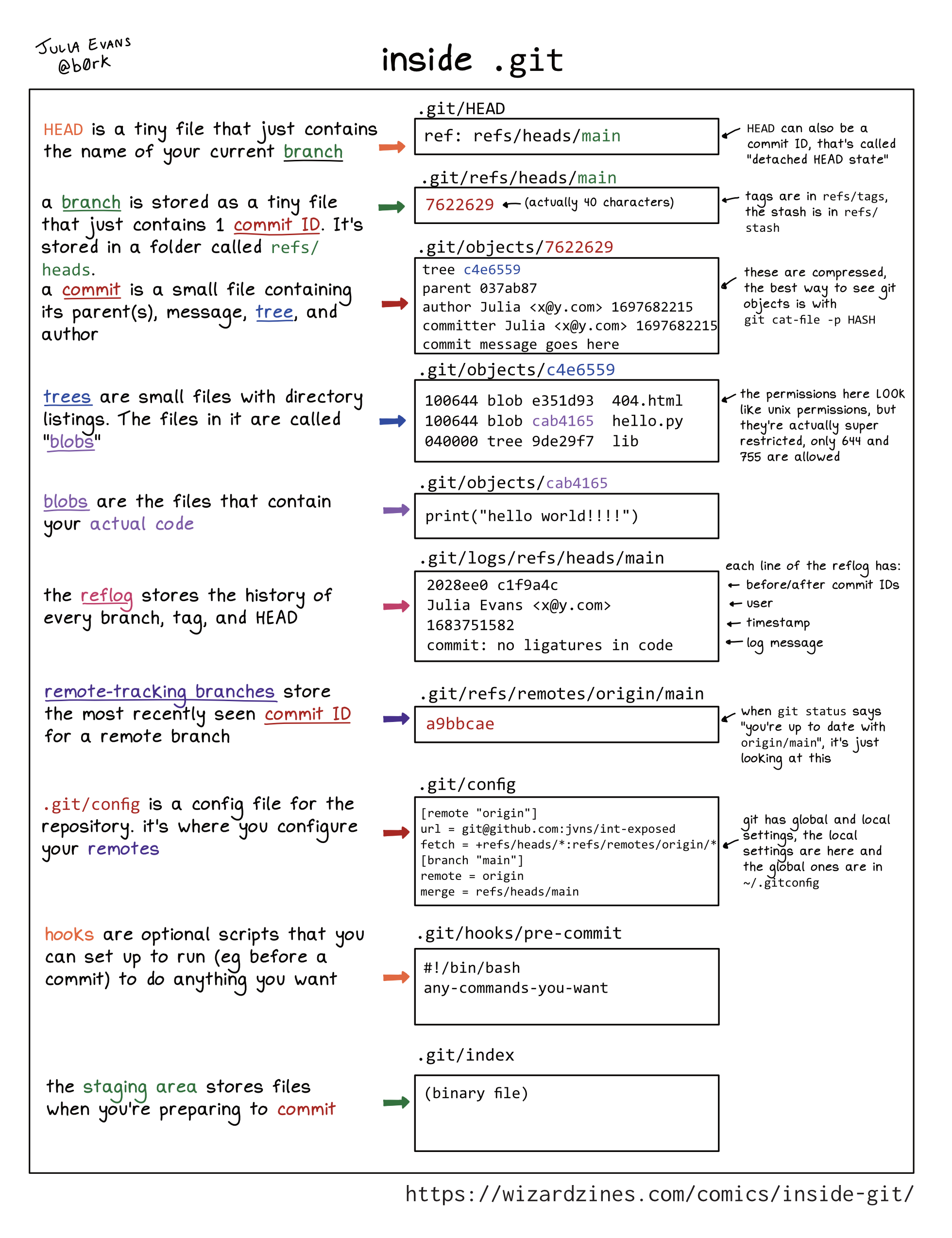
You can git clone https://github.com/jvns/inside-git if you want to run all
these examples yourself.
Here’s a table of contents:
- HEAD: .git/head
- branch: .git/refs/heads/main
- commit: .git/objects/10/93da429…
- tree: .git/objects/9f/83ee7550…
- blobs: .git/objects/5a/475762c…
- reflog: .git/logs/refs/heads/main
- remote-tracking branches: .git/refs/remotes/origin/main
- tags: .git/refs/tags/v1.0
- the stash: .git/refs/stash
- .git/config
- hooks: .git/hooks/pre-commit
- the staging area: .git/index
- this isn’t exhaustive
- this isn’t meant to completely explain git
The first 5 parts (HEAD, branch, commit, tree, blobs) are the core of git.
HEAD: .git/head
HEAD is a tiny file that just contains the name of your current branch.
Example contents:
$ cat .git/HEAD
ref: refs/heads/main
HEAD can also be a commit ID, that’s called “detached HEAD state”.
branch: .git/refs/heads/main
A branch is stored as a tiny file that just contains 1 commit ID. It’s stored
in a folder called refs/heads.
Example contents:
$ cat .git/refs/heads/main
1093da429f08e0e54cdc2b31526159e745d98ce0
commit: .git/objects/10/93da429...
A commit is a small file containing its parent(s), message, tree, and author.
Example contents:
$ git cat-file -p 1093da429f08e0e54cdc2b31526159e745d98ce0
tree 9f83ee7550919867e9219a75c23624c92ab5bd83
parent 33a0481b440426f0268c613d036b820bc064cdea
author Julia Evans <julia@example.com> 1706120622 -0500
committer Julia Evans <julia@example.com> 1706120622 -0500

add hello.py
These files are compressed, the best way to see objects is with git cat-file -p HASH.
tree: .git/objects/9f/83ee7550...
Trees are small files with directory listings. The files in it are called blobs.
Example contents:
$  git cat-file -p 9f83ee7550919867e9219a75c23624c92ab5bd83
100644 blob e69de29bb2d1d6434b8b29ae775ad8c2e48c5391	.gitignore
100644 blob 665c637a360874ce43bf74018768a96d2d4d219a	hello.py
040000 tree 24420a1530b1f4ec20ddb14c76df8c78c48f76a6	lib
The permissions here LOOK like unix permissions, but they’re actually super restricted, only 644 and 755 are allowed.
blobs: .git/objects/5a/475762c...
blobs are the files that contain your actual code
Example contents:
$ git cat-file -p 665c637a360874ce43bf74018768a96d2d4d219a
print("hello world!")
Storing a new blob with every change can get big, so git gc periodically
packs them for efficiency in .git/objects/pack.
reflog: .git/logs/refs/heads/main
The reflog stores the history of every branch, tag, and HEAD. For (mostly) every file in .git/refs, there’s a corresponding log in .git/logs/refs.
Example content for the main branch:
$ tail -n 1 .git/logs/refs/heads/main
33a0481b440426f0268c613d036b820bc064cdea
1093da429f08e0e54cdc2b31526159e745d98ce0
Julia Evans <julia@example.com>
1706119866 -0500
commit: add hello.py
each line of the reflog has:
- before/after commit IDs
- user
- timestamp
- log message
Normally it’s all one line, I just wrapped it for readability here.
remote-tracking branches: .git/refs/remotes/origin/main
Remote-tracking branches store the most recently seen commit ID for a remote branch
Example content:
$ cat .git/refs/remotes/origin/main
fcdeb177797e8ad8ad4c5381b97fc26bc8ddd5a2
When git status says “you’re up to date with origin/main”, it’s just looking
at this. It’s often out of date, you can update it with git fetch origin main.
tags: .git/refs/tags/v1.0
A tag is a tiny file in .git/refs/tags containing a commit ID.
Example content:
$ cat .git/refs/tags/v1.0
1093da429f08e0e54cdc2b31526159e745d98ce0
Unlike branches, when you make new commits it doesn’t update the tag.
the stash: .git/refs/stash
The stash is a tiny file called .git/refs/stash. It contains the commit ID of a commit that’s created when you run git stash.
cat .git/refs/stash
62caf3d918112d54bcfa24f3c78a94c224283a78
The stash is a stack, and previous values are stored in .git/logs/refs/stash (the reflog for stash).
cat .git/logs/refs/stash
62caf3d9 e85c950f Julia Evans <julia@example.com> 1706290652 -0500	WIP on main: 1093da4 add hello.py
00000000 62caf3d9 Julia Evans <julia@example.com> 1706290668 -0500	WIP on main: 1093da4 add hello.py
Unlike branches and tags, if you git stash pop a commit from the stash, it’s
deleted from the reflog so it’s almost impossible to find it again. The
stash is the only reflog in git where things get deleted very soon after
they’re added. (entries expire out of the branch reflogs too, but generally
only after 90 days)
A note on refs:
At this point you’ve probably noticed that a lot of things (branches,
remote-tracking branches, tags, and the stash) are commit IDs in .git/refs.
They’re called “references” or “refs”. Every ref is a commit ID, but the
different types of refs are treated VERY differently by git, so I find it
useful to think about them separately even though they all use
the same file format. For example, git deletes things from the stash reflog in
a way that it won’t for branch or tag reflogs.
.git/config
.git/config is a config file for the repository. It’s where you configure
your remotes.
Example content:
[remote "origin"]
url = git@github.com: jvns/int-exposed
fetch = +refs/heads/*: refs/remotes/origin/*
[branch "main"]
remote = origin
merge refs/heads/main
git has local and global settings, the local settings are here and the global
ones are in ~/.gitconfig hooks
hooks: .git/hooks/pre-commit
Hooks are optional scripts that you can set up to run (eg before a commit) to do anything you want.
Example content:
#!/bin/bash
any-commands-you-want
(this obviously isn’t a real pre-commit hook)
the staging area: .git/index
The staging area stores files when you’re preparing to commit. This one is a binary file, unlike a lot of things in git which are essentially plain text files.
As far as I can tell the best way to look at the contents of the index is with git ls-files --stage:
$ git ls-files --stage
100644 e69de29bb2d1d6434b8b29ae775ad8c2e48c5391 0	.gitignore
100644 665c637a360874ce43bf74018768a96d2d4d219a 0	hello.py
100644 e69de29bb2d1d6434b8b29ae775ad8c2e48c5391 0	lib/empty.py
this isn’t exhaustive
There are some other things in .git like FETCH_HEAD, worktrees, and
info. I only included the ones that I’ve found it useful to understand.
this isn’t meant to completely explain git
One of the most common pieces of advice I hear about git is “just learn how
the .git directory is structured and then you’ll understand everything!”.
I love understanding the internals of things more than anyone, but there’s a LOT that “how the .git directory is structured” doesn’t explain, like:
- how merges and rebases work and how they can go wrong (for instance this list of what can go wrong with rebase)
- how exactly your colleagues are using git, and what guidelines you should be following to work with them successfully
- how pushing/pulling code from other repositories works
- how to handle merge conflicts
Hopefully this will be useful to some folks out there though.
some other references:
- the book building git by James Coglan (side note: looks like there’s a 50% off discount for the rest of January)
- git from the inside out by mary rose cook
- the official git repository layout docs
Xeact: The femtoframework you've been waiting for
Using details/summary and colour coding on GitHub pages
A message from Techaro's founder, Edwin Allison
Another round of bookmarks
I had not realised it had been 805 days since my last bookmarks roundup. 805 days. This section is still one of the most visited parts of my little web corner.
It's been so long that I have accumulated an intimidating number of bookmarks. On the other hand, I did go on maternity leave and stayed away from the tech world for a while. I started the draft for this post in May 2023, and here I am, on January 2024, finally sharing it. It's a good thing that for the past few weeks, people have been talking a bit more about their bookmarks, and because I want to move to a system of individual link sharing rather than bulk, I needed to get this batch out of the way.
This post will mostly include links from 2022 - things I bookmarked while on maternity leave. It's great to revisit these because I have no memories of that time.
I hope to get another batch of bookmarks from May 2023 out soon, and then I will move on to add them individually. I mentioned before somewhere in these posts, but adding them as a batch isn't working for me right now. I used to do it monthly, but if it is a month that I bookmark a lot, it will be a long post to curate. Right now, this format takes me at least one hour to create. I could switch to a weekly post but must integrate it into my routine. Maybe forcing a time slot every Friday morning or something. I also like the idea of individual link posts so that I can add tags and get back to them quickly.
Bookmarks related to tech and web development
- Using Position Sticky With CSS Grid by Ahmad Shadeed.
- Doing the work by Monica Dinculescu.
- Stream on by Simon Collison.
- a11y.css by Gaël Poupard.
- 12 Days of Web by Stephanie Eckles.
- Pixel patterns by Chuan.
- Subterranean Blogging by Tom Critchlow.
- Fix Contrast.
- Esoteric.Codes by Daniel Temkin.
- Generate a Pull Request of Static Content With a Simple HTML Form by Hilman Ramadhan.
- How To Use Contentful With Eleventy by Henry Desroches.
- WHCM and System Colors by Adrian Roselli.
- Getting Started With Accessibility: Dynamic Type by Bas Thomas Broek.
- SVG Generators by Iris Lješnjanin.
- All the Eleventy things by David Darnes.
- Web accessibility simplified.
- How I Make CSS Art by Yosra Emad.
- How to keep up with web development without falling into despair by Baldur Bjarnason.
- “Evergreen” Does Not Mean Immediately Available by Eric Bailey.
- Reducing The Web’s Carbon Footprint: Optimizing Social Media Embeds by Michelle Barker.
- Aspect Ratio is Great by Michelle Barker.
- Websites as an Act of Creativity by Yesterweb Zine.
- Digital Cleanup Day.
- Estimate how many people using your website might be disabled.
- From Tumblr girl to engineer: How the platform inspired a generation of women to code by Elizabeth de Luna.
- Using the language attribute to make your website accessible by Craig Abbott.
- Don’t Alienate Your User: A Primer for Internationalisation & Localisation by Sophie Clifton-Tucker.
- What is the Web? by Jim Nielsen.
- Understanding Layout Algorithms by Josh W Comeau.
- Privacy and the :visited selector.
- Notes on a Blogging Accelerator by Tom Critchlow.
- Home Sweet Homepage by Amy Wibowo.
- Mourning loss as a remote team.