Reading List
The most recent articles from a list of feeds I subscribe to.
Code brushes for GitHub Copilot
Mostly on Mastodon
I'm mostly on Mastodon now (I'm @hdv). What I mean by that I try and keep up with what people share on their Mastodon timeline and no longer do so on Twitter.
In the past weeks, I've gone to “mostly Mastodon” from “partially Mastodon and partially Twitter”. I did join a Twitter Space and still post every now and then, but it feels increasingly uncomfortable. I also monitor DMs, but will give out iMessage/LINE/Signal info to any mutual who wants a better way to contact me.
I wrote about reasons to leave Twitter earlier, new reasons pile up:
- a lot of the people I care about are now on Mastodon or stopped posting on Twitter (yay)
- quality matters more than quantity
- Mastodon has open ways to syndicate your content (it's been long since Twitter had open APIs)
- Twitter is mostly ChatGPT screenshots these days anyway (only partially kidding)
- the new owner tweets a lot about “woke” as if it is a bad thing
- the new owner doesn't seem to understand basic concepts like truth and free speech, but, and this is my main issue, continues to make bold claims about them, while running and making decisions about Twitter
- the new owner spreads misinformation including about public health, again, while running and making decisions about Twitter
So, I'm mostly not spending time on Twitter.
I'm mostly on Mastodon, instead. What does that mean? I post there primarily and only occassionally (and manually) cross-post to Twitter. I consciously choose Mastodon when engaging with cross-posted tweets, sometimes this means looking up a toot-version of a tweet, which is a bit of a nuisance, but fine. I've put my Mastodon presence on slide decks instead or in addition to Twitter, and added it to the footer of posts.
Maybe you wonder why I don't just go, why I share all this? Touché. Well, it's been a non trivial decision for me, after decades on Twitter and making lots of connections there, the start of many professional and not-so-professional relationships and friendships. I can imagine it's the same for you. If you're reading this and are still mostly on Twitter, may I ask you to consider spending more time on Mastodon? It isn't as hard to use as sceptics make it out to be. Together we impact which place is more worthwhile.
Originally posted as Mostly on Mastodon on Hidde's blog.
Pioneers in Open Source Interview: Browsers, Bootcamps & the Business of Open Source
A debugging manifesto
Hello! I’ve been working on a zine about debugging for the last 6 months with my friend Marie, and one of the problems we ran into was figuring out how to explain the right attitude to take when debugging.
We ended up writing a short debugging manifesto to start the zine with, and I’m pretty happy with how it came out. Here it is as an image, and as text (with some extra explanations)
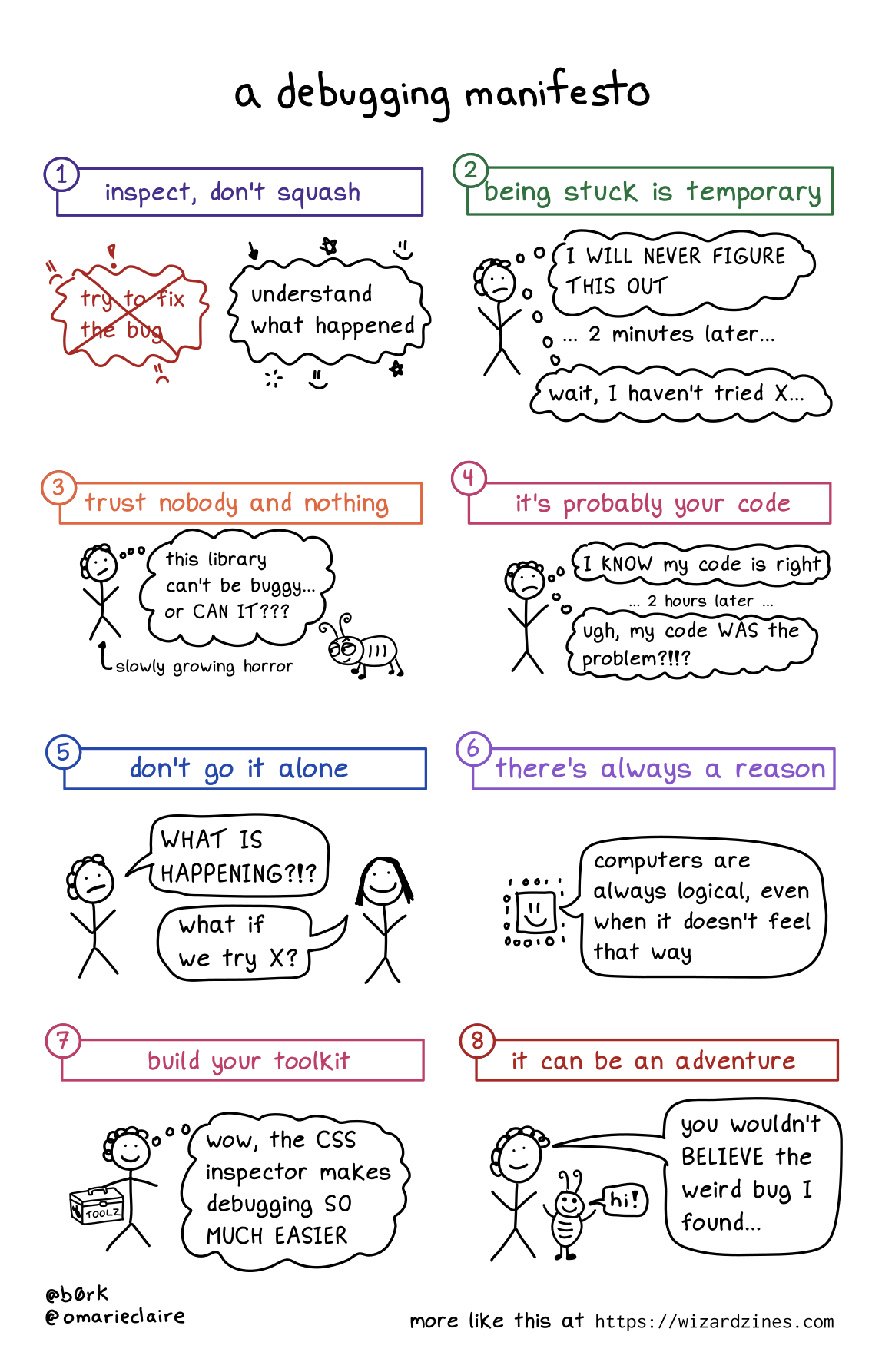
1. Inspect, don’t squash
When you run into a bug, the natural instinct is to try to fix it as fast as possible. And of course, sometimes that’s what you have to do – if the bug is causing a huge production incident, you have to mitigate it quickly before diving into figuring out the root cause.
But in my day to day debugging, I find that it’s generally more effective (and faster!) to leave the bug in place, figure out exactly what’s gone wrong, and then fix it after I’ve understood what happened.
Trying to fix it or add workarounds without fully understanding what happened usually ends up just leaving me more confused.
2. Being stuck is temporary
Sometimes I get really demoralized when debugging and it feels like I’ll NEVER make progress.
I have to remind myself that I’ve fixed a lot of bugs before, and I’ll probably fix this one too :)
3. Trust nobody and nothing
Sometimes bugs come from surprising sources! For example, in I think I found a Mac kernel bug? I describe how, the first time I tried to write a program for Mac OS, I had a bug in my program that was caused by a Mac OS kernel bug.
This was really surprising (usually the operating system is not at fault!!), but sometimes even normally-trustworthy sources are wrong. Even it’s a popular library, your operating system, the official documentation, or an extremely smart and competent coworker!
4. It’s probably your code
That said, almost all of the time the problem is not “there’s a bug in Mac OS”. I can only speak for myself, but 95% of the time something is going wrong with my program, it’s because I did something silly.
So it’s important to look for the problem in your own code first before trying to blame some external source.
5. Don’t go it alone
I’ve learned SO much by asking coworkers or friends for help with debugging. I think it’s one of the most fun ways to collaborate because you have a specific goal, and there are tons of opportunities to share information like:
- how to use a specific debugging tool (“here’s how to use GDB to inspect the memory here….”)
- how a computer thing works (“hey, can you explain CORS?”)
- similar past bugs (“I’ve seen this break in X way in the past, maybe it’s that?”)
6. There’s always a reason
This one kind of speaks for itself: sometimes it feels like things are just randomly breaking for no reason, but that’s never true.
Even if something truly weird is happening (like a hardware problem), that’s still a reason.
7. Build your toolkit
I’ve written a LOT about my love for debugging tools like tcpdump, strace, and more on this blog.
To fix bugs you need information about what your program is doing, and to get that information sometimes you need to learn a new tool.
Also, sometimes you need to build your own better tools, like by improving your test suite, pretty printing, etc.
8. It can be an adventure
As you probably know if you’re a regular reader of this blog, I love debugging and I’ve learned a lot from doing it. You get to learn something new! Sometimes you get a great war story to tell! What could be more fun?
I really think of debugging as an investment in my future knowledge – if something is breaking, it’s often because there’s something wrong in my mental model, and that’s an opportunity to learn and make sure that I know it for next time.
Of course, not all bugs are adventures (that off-by-one error I was debugging today certainly did not feel like a fun adventure). But I think it’s important to (as much as you can) reflect on your bugs and see what you can learn from them.
↗ Deterministic bliss in static methods
Static methods tend to have a bad reputation in PHP, but I believe (stateless) static methods are underused. In static functions, there’s no internal state to take into account. Calculator::sum(1, 2) only depends on its input, and will always return 3.
While researching for another post, I came across an article from Mathias Verraes that already says everything I wanted to say.
It is stateless, it is free of side effects, and as such, it is entirely predictable. You can call the exact same function with the exact same argument as often as you like, and you will always get the exact same result back.