Reading List
The most recent articles from a list of feeds I subscribe to.
Migraining to a new server
The GraphicalEmoji hack
My ideal accessible components resource is holistic, well tested and easy to use
It would be easier to have an accessible web if all we did with it was publish documents. Blobs of text, images here and there. But modern sites (or “applications”) do a lot more than documents. Often for better, sometimes for worse. To improve accessibility of the web as it is today, I feel we dearly need accessibility guidance that is holistic, well tested and easy to use.
Web sites or applications often come with menus, tooltips, dialogs, drag and drop, tabs and emoji pickers. Some say this is unnecessary and argue interfaces must be simpler. Sometimes they are right—a lot of interfaces can benefit from being simpler. Yet, complex UI components are often genuinely helpful to users. Like, it's good if not all information is always visible at the same time. Hiding less important stuff in less prominent places can help hierarchy. It can be good if, instead of selecting a city from a <select> of thousands, there's some comboboxing going on. ‘No that's an input!’, you say… yeah, maybe, but it could be important for the business to have a city chosen out of a predefined list of options. And that can give certainties that are beneficial to users too.
So, complex UI patterns (widgets, components, etc) are sometimes needed. A lot of sites have them, for reasons ranging from good to bad. A lot of organisations hand-build these components as part of a design system effort, to make their investments reusable. Reusable components can have a huge impact on accessibilility. Because reuse means repetition: of good patterns, bad patterns, accessible patterns, inaccessible patterns… the stakes are high!
Over the years I've seen and heard a lot of developers talk about building components. I heard them speak about the developer experience of building these components. When I was working on guidance at WAI, I listened extra carefully. From what I gathered, many actually want to truly invest in the quality of their components, including the accessibility of those components. But the official guidance they can find is lacking: WCAG's supporting documents are often unclear (with reading levels, for what they are worth, up to professor grade), unpractical (a lot more words than concrete advice) and outdated (eg still recommending the title attribute). WCAG still works best for the web as a series of documents.
In other words, to better match the realities of people making websites, I feel the W3C's accessibility guidance should be more holistic, well-tested and easy to use.
Holistic
The closest to a guide on building accessible components is the ARIA Authoring Practices Guide (“APG”). It's a super useful resource for finding how to build components with ARIA, but it isn't “holistic”.
By holistic advice, I mean advice that considers the reader within their entire environment as a developer. Advice that builds on the best that can be done with HTML, CSS, JavaScript, WAI-ARIA and SVG (technologies websites commonly rely upon). The WAI-ARIA Authoring Practices Guide isn't holistic in that sense: it focuses on patterns built with ARIA only. From developer-who-wants-advice or user-who-needs-a-good-experience perspectives, that's not ideal. As accessibility specialists learn again and again, WAI-ARIA isn't what makes components accessible, it's merely one of the languages (ok, an ontology) that can help us build accessibly (see also: the first rule of ARIA). I don't mean to say any of these specificiations is inherently better, I mean the most accessible component is always some combination of these specs.
If that's the case, you may wonder, why does APG focus on ARIA only? There's no bad intent here… I think it is simply because it is written by a subgroup of the ARIA Working Group. That Working Group specifies ARIA and it has a deliverable to show how to use it. This makes good sense. But again, it isn't ideal if the intention is guidance that helps developers build the very best for users with disabilities (which I think is the goal we should really want to optimise for). Nobody seems to have that as a deliverable.
There is a W3C/WAI resource that is holistic in the way I described: WAI Tutorials. Shoutout to the great work of Eric Eggert and EOWG! It's a good resource, but it did not get expanded or updated much after the initial release.
There are resources outside of W3C/WAI that I can recommend, such as:
- Sarah Higley's posts on tooltips and custom selects
- Sara Soueidan on icon buttons and custom checkboxes/radiobuttons
- Accessible Components by Scott O'Hara
- Adrian Roselli's “Under-Engineered” series
- A complete guide to accessible front-end components by Vitaly Friedman
Well tested
Web accessibility ultimately is about whether people can use a thing. Some friends in the accessibility community like to emphasise that it's about people, not meeting standards. I get that sentiment, but there's a false dichotomy at play: making the web more usable for people with disabilities is a central goal for accessibility standards at organisations like W3C/WAI) They are a means to the same end. Either way, web accessibility is all about people. So, yes, user testing matters. We've got to find out which specific patterns are mostly to work well for people.
While it's essential and beneficial to involve people with disabilities in user tests, there can be challenges:
- just like one single user doesn't speak for all users, one person with a disability doesn't speak for everyone with that disability; you'll want larger samples;
- there are many disabilities; sometimes people with different disabilities could even have “competing” needs. For instance, high contrast benefits some, but could constitute a barrier to others;
- it may be more difficult to recruit users with disabilities and ensure the group you recruit for a given project is the right group in terms of what you want to test;
My friend Peter has documented some of his approach to testing with disabled users and WAI itself has a great page on involving users with disabilities too. Others have blogged about their user testing efforts: Fable tested Loom's video clipping functionality and the GOV.UK Design System team documented what they found testing conditionally revealing questions. These posts show there is a lot of nuance in determining if a complex pattern is accessible. But they also show this nuance can be described and help inform people.
As an aside: another aspect of testing guidance for accessible components is how well they perform across different browsers and assistive technologies. Bocoup, Meta and others are doing great work in this area in the ARIA-AT effort: they define tests (over a thousand drafted), but also pioneer ways to test assistive technologies automatically. I believe the plan is (was?) to show the results of this project next to code examples, which is great.
Easy to use
‘Developer experience’ is a phrase sometimes frowned upon, especially when contrasted with user experience. If we had to choose between them, of course, user experience would be the first choice. But the choice isn't binary like that. If the stars are aligned, one can lead to the other. Companies that make developer-focused products (like CMSes, versioning control, authentication, payment providers, databases etc) usually have a dedicated “developer experience” department that ensures developers can use the product well. Among other things, they try to reduce friction.
Friction could result in income loss for these companies. If the tool constantly displays unhelpful error messages, has code examples that are tricky to follow or documentation that is out of date, developers might look for a different tool. And the opposite is true too: if this payment provider makes it super easy to implement secure payments, a developer will likely want to use it again.
Friction could also cause a product to be “used wrong”. For instance, large groups of developers easily got started with this cool new authentication product, but the docs were so unclear that they missed important security steps? Or, in a CI/CD product, developers manage to get started quickly, but a majority does it in a way that uses way too many resources, because the example projects do? If the company charges overages unexpectedly, it may upset customers, if it doesn't, it could end up costing the company too much.
I'll admit it is a bit of a stretch: what if both of these frictions are at play with accessibility standards? And instead of looking for different standards, developers choose the “easier” route of inaccessibility? This could happen in places where leadership or organisational procedures don't enforce accessibility. They'll get away with it. It could also happen in places that do have a mature accessibility program or even a handful of accessibility-minded individual developers. If the most accessible solution isn't easy to learn (e.g. they get lost between different kinds of guidance), it could still result in inaccessibility, even with the best intentions.
I believe effective accessibility guidance answers “how easy will this make it for people to get it right”, and probably also ”how will this avoid that people take the wrong turn”.
Some examples of what could constitute good developer experience (dreaming aloud here):
- easy to copy examples that closely match real-world components people are building, like privacy setting banners and comboboxes (just to name two examples of major barriers I saw blind users encounters in a user test)
- full example projects for some popular frameworks and languages, eg here's how to build an accessible blog with Next.js, or how to report errors in a form in vanilla JS + 5 popular frameworks
- a specific focus on eliminating inconsistencies in documentation (“boring” work, maybe, but inconsistencies inevitably creep into any set of content—the more inconsistencies are avoided, the more effective documentation is)
While these examples are developer focused, the same kind of focus could be applied other roles like quality assurance and design (see also Roles involved in accessibility, which is a great document, though still in draft status).
I suspect many people with disabilities among us have a mental list or accessibility barriere they encounter most often. Many who do regular accessibility audits will have a list of things they find often. Many developers will have a list of components they are unsure how to build accessibly. Et cetera, et cetera. If I had a magic wand, I would try and put all of these people in one room.
In summary
In this post, I've tried to lay out what my ideal accessibility guidance looks like. The gist of it is: make it easier for people to get accessibility right. And the opposite, too: make it harder to get it wrong. I feel the closer we can get to that, the more accessible interfaces can become. I think this is the way to go: guidance that is holistic, well-tested and optimised for developer experience (or, more broadly, the experience of anyone touching web projects in a way that can make or break accessibility).
And to be clear, this is not an invite for people to care less or circumvent the responsibilities and duties they have. Accessibility needs to be part of one's MVP. But it is an invite for people to rethink our collective efforts in improving web accessibility: WCAG 3.0 may not be it, the world may benefit more from better guidance than from better testing methodologies.
My expectations are probably a tad unrealistic. I probably missed my chance to try and materialise them more when I worked for WAI. Yet, I hope the perspective is helpful to some. Get in touch if you have thoughts!
Originally posted as My ideal accessible components resource is holistic, well tested and easy to use on Hidde's blog.
Sherlock is back after a week away
The post Sherlock is back after a week away appeared first on David Peach.
Some possible reasons for 8-bit bytes
I’ve been working on a zine about how computers represent thing in binary, and one question I’ve gotten a few times is – why does the x86 architecture use 8-bit bytes? Why not some other size?
With any question like this, I think there are two options:
- It’s a historical accident, another size (like 4 or 6 or 16 bits) would work just as well
- 8 bits is objectively the Best Option for some reason, even if history had played out differently we would still use 8-bit bytes
- some mix of 1 & 2
I’m not super into computer history (I like to use computers a lot more than I like reading about them), but I am always curious if there’s an essential reason for why a computer thing is the way it is today, or whether it’s mostly a historical accident. So we’re going to talk about some computer history.
As an example of a historical accident: DNS has a class field which has 5
possible values (“internet”, “chaos”, “hesiod”, “none”, and “any”). To me that’s
a clear example of a historical accident – I can’t imagine that we’d define
the class field the same way if we could redesign DNS today without worrying about backwards compatibility. I’m
not sure if we’d use a class field at all!
There aren’t any definitive answers in this post, but I asked on Mastodon and here are some potential reasons I found for the 8-bit byte. I think the answer is some combination of these reasons.
what’s the difference between a byte and a word?
First, this post talks about “bytes” and “words” a lot. What’s the difference between a byte and a word? My understanding is:
- the byte size is the smallest unit you can address. For example in a program on my machine
0x20aa87c68might be the address of one byte, then0x20aa87c69is the address of the next byte. - The word size is some multiple of the byte size. I’ve been confused about this for years, and the Wikipedia definition is incredibly vague (“a word is the natural unit of data used by a particular processor design”). I originally thought that the word size was the same as your register size (64 bits on x86-64). But according to section 4.1 (“Fundamental Data Types”) of the Intel architecture manual, on x86 a word is 16 bits even though the registers are 64 bits. So I’m confused – is a word on x86 16 bits or 64 bits? Can it mean both, depending on the context? What’s the deal?
Now let’s talk about some possible reasons that we use 8-bit bytes!
reason 1: to fit the English alphabet in 1 byte
This Wikipedia article says that the IBM System/360 introduced the 8-bit byte in 1964.
Here’s a video interview with Fred Brooks (who managed the project) talking about why. I’ve transcribed some of it here:
… the six bit bytes [are] really better for scientific computing and the 8-bit byte ones are really better for commercial computing and each one can be made to work for the other. So it came down to an executive decision and I decided for the 8-bit byte, Jerry’s proposal.
[….]
My most important technical decision in my IBM career was to go with the 8-bit byte for the 360. And on the basis of I believe character processing was going to become important as opposed to decimal digits.
It makes sense that an 8-bit byte would be better for text processing: 2^6 is 64, so 6 bits wouldn’t be enough for lowercase letters, uppercase letters, and symbols.
To go with the 8-bit byte, System/360 also introduced the EBCDIC encoding, which is an 8-bit character encoding.
It looks like the next important machine in 8-bit-byte history was the Intel 8008, which was built to be used in a computer terminal (the Datapoint 2200). Terminals need to be able to represent letters as well as terminal control codes, so it makes sense for them to use an 8-bit byte. This Datapoint 2200 manual from the Computer History Museum says on page 7 that the Datapoint 2200 supported ASCII (7 bit) and EBCDIC (8 bit).
why was the 6-bit byte better for scientific computing?
I was curious about this comment that the 6-bit byte would be better for scientific computing. Here’s a quote from this interview from Gene Amdahl:
I wanted to make it 24 and 48 instead of 32 and 64, on the basis that this would have given me a more rational floating point system, because in floating point, with the 32-bit word, you had to keep the exponent to just 8 bits for exponent sign, and to make that reasonable in terms of numeric range it could span, you had to adjust by 4 bits instead of by a single bit. And so it caused you to lose some of the information more rapidly than you would with binary shifting
I don’t understand this comment at all – why does the exponent have to be 8 bits if you use a 32-bit word size? Why couldn’t you use 9 bits or 10 bits if you wanted? But it’s all I could find in a quick search.
why did mainframes use 36 bits?
Also related to the 6-bit byte: a lot of mainframes used a 36-bit word size. Why? Someone pointed out that there’s a great explanation in the Wikipedia article on 36-bit computing:
Prior to the introduction of computers, the state of the art in precision scientific and engineering calculation was the ten-digit, electrically powered, mechanical calculator… These calculators had a column of keys for each digit, and operators were trained to use all their fingers when entering numbers, so while some specialized calculators had more columns, ten was a practical limit
Early binary computers aimed at the same market therefore often used a 36-bit word length. This was long enough to represent positive and negative integers to an accuracy of ten decimal digits (35 bits would have been the minimum)
So this 36 bit thing seems to based on the fact that log_2(20000000000) is 34.2. Huh.
My guess is that the reason for this is in the 50s, computers were extremely expensive. So if you wanted your computer to support ten decimal digits, you’d design so that it had exactly enough bits to do that, and no more.
Today computers are way faster and cheaper, so if you want to represent ten decimal digits for some reason you can just use 64 bits – wasting a little bit of space is usually no big deal.
Someone else mentioned that some of these machines with 36-bit word sizes let you choose a byte size – you could use 5 or 6 or 7 or 8-bit bytes, depending on the context.
reason 2: to work well with binary-coded decimal
In the 60s, there was a popular integer encoding called binary-coded decimal (or BCD for short) that encoded every decimal digit in 4 bits.
For example, if you wanted to encode the number 1234, in BCD that would be something like:
0001 0010 0011 0100
So if you want to be able to easily work with binary-coded decimal, your byte size should be a multiple of 4 bits, like 8 bits!
why was BCD popular?
This integer representation seemed really weird to me – why not just use binary, which is a much more efficient way to store integers? Efficiency was really important in early computers!
My best guess about why is that early computers didn’t have displays the same way we do now, so the contents of a byte were mapped directly to on/off lights.
Here’s a picture from Wikipedia of an IBM 650 with some lights on its display (CC BY-SA 3.0):

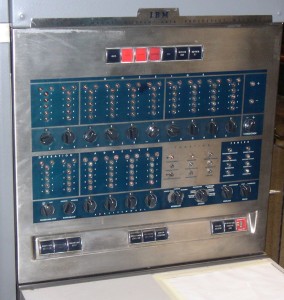
So if you want people to be relatively able to easily read off a decimal number from its binary representation, this makes a lot more sense. I think today BCD is obsolete because we have displays and our computers can convert numbers represented in binary to decimal for us and display them.
Also, I wonder if BCD is where the term “nibble” for 4 bits comes from – in the context of BCD, you end up referring to half bytes a lot (because every digits is 4 bits). So it makes sense to have a word for “4 bits”, and people called 4 bits a nibble. Today “nibble” feels to me like an archaic term though – I’ve definitely never used it except as a fun fact (it’s such a fun word!). The Wikipedia article on nibbles supports this theory:
The nibble is used to describe the amount of memory used to store a digit of a number stored in packed decimal format (BCD) within an IBM mainframe.
Another reason someone mentioned for BCD was financial calculations. Today if you want to store a dollar amount, you’ll typically just use an integer amount of cents, and then divide by 100 if you want the dollar part. This is no big deal, division is fast. But apparently in the 70s dividing an integer represented in binary by 100 was very slow, so it was worth it to redesign how you represent your integers to avoid having to divide by 100.
Okay, enough about BCD.
reason 3: 8 is a power of 2?
A bunch of people said it’s important for a CPU’s byte size to be a power of 2. I can’t figure out whether this is true or not though, and I wasn’t satisfied with the explanation that “computers use binary so powers of 2 are good”. That seems very plausible but I wanted to dig deeper. And historically there have definitely been lots of machines that used byte sizes that weren’t powers of 2, for example (from this retro computing stack exchange thread):
- Cyber 180 mainframes used 6-bit bytes
- the Univac 1100 / 2200 series used a 36-bit word size
- the PDP-8 was a 12-bit machine
Some reasons I heard for why powers of 2 are good that I haven’t understood yet:
- every bit in a word needs a bus, and you want the number of buses to be a power of 2 (why?)
- a lot of circuit logic is susceptible to divide-and-conquer techniques (I think I need an example to understand this)
Reasons that made more sense to me:
- it makes it easier to design clock dividers that can measure “8 bits were sent on this wire” that work based on halving – you can put 3 halving clock dividers in series. Graham Sutherland told me about this and made this really cool simulator of clock dividers showing what these clock dividers look like. That site (Falstad) also has a bunch of other example circuits and it seems like a really cool way to make circuit simulators.
- if you have an instruction that zeroes out a specific bit in a byte, then if your byte size is 8 (2^3), you can use just 3 bits of your instruction to indicate which bit. x86 doesn’t seem to do this, but the Z80’s bit testing instructions do.
- someone mentioned that some processors use Carry-lookahead adders, and they work in groups of 4 bits. From some quick Googling it seems like there are a wide variety of adder circuits out there though.
- bitmaps: Your computer’s memory is organized into pages (usually of size 2^n). It needs to keep track of whether every page is free or not. Operating systems use a bitmap to do this, where each bit corresponds to a page and is 0 or 1 depending on whether the page is free. If you had a 9-bit byte, you would need to divide by 9 to find the page you’re looking for in the bitmap. Dividing by 9 is slower than dividing by 8, because dividing by powers of 2 is always the fastest thing.
I probably mangled some of those explanations pretty badly: I’m pretty far out of my comfort zone here. Let’s move on.
reason 4: small byte sizes are good
You might be wondering – well, if 8-bit bytes were better than 4-bit bytes, why not keep increasing the byte size? We could have 16-bit bytes!
A couple of reasons to keep byte sizes small:
- It’s a waste of space – a byte is the minimum unit you can address, and if your computer is storing a lot of ASCII text (which only needs 7 bits), it would be a pretty big waste to dedicate 12 or 16 bits to each character when you could use 8 bits instead.
- As bytes get bigger, your CPU needs to get more complex. For example you need one bus line per bit. So I guess simpler is better.
My understanding of CPU architecture is extremely shaky so I’ll leave it at that. The “it’s a waste of space” reason feels pretty compelling to me though.
reason 5: compatibility
The Intel 8008 (from 1972) was the precursor to the 8080 (from 1974), which was the precursor to the 8086 (from 1976) – the first x86 processor. It seems like the 8080 and the 8086 were really popular and that’s where we get our modern x86 computers.
I think there’s an “if it ain’t broke don’t fix it” thing going on here – I assume that 8-bit bytes were working well, so Intel saw no need to change the design. If you keep the same 8-bit byte, then you can reuse more of your instruction set.
Also around the 80s we start getting network protocols like TCP which use 8-bit bytes (usually called “octets”), and if you’re going to be implementing network protocols, you probably want to be using an 8-bit byte.
that’s all!
It seems to me like the main reasons for the 8-bit byte are:
- a lot of early computer companies were American, the most commonly used language in the US is English
- those people wanted computers to be good at text processing
- smaller byte sizes are in general better
- 7 bits is the smallest size you can fit all English characters + punctuation in
- 8 is a better number than 7 (because it’s a power of 2)
- once you have popular 8-bit computers that are working well, you want to keep the same design for compatibility
Someone pointed out that page 65 of this book from 1962 talking about IBM’s reasons to choose an 8-bit byte basically says the same thing:
- Its full capacity of 256 characters was considered to be sufficient for the great majority of applications.
- Within the limits of this capacity, a single character is represented by a single byte, so that the length of any particular record is not dependent on the coincidence of characters in that record.
- 8-bit bytes are reasonably economical of storage space
- For purely numerical work, a decimal digit can be represented by only 4 bits, and two such 4-bit bytes can be packed in an 8-bit byte. Although such packing of numerical data is not essential, it is a common practice in order to increase speed and storage efficiency. Strictly speaking, 4-bit bytes belong to a different code, but the simplicity of the 4-and-8-bit scheme, as compared with a combination 4-and-6-bit scheme, for example, leads to simpler machine design and cleaner addressing logic.
- Byte sizes of 4 and 8 bits, being powers of 2, permit the computer designer to take advantage of powerful features of binary addressing and indexing to the bit level (see Chaps. 4 and 5 ) .
Overall this makes me feel like an 8-bit byte is a pretty natural choice if you’re designing a binary computer in an English-speaking country.