Reading List
The most recent articles from a list of feeds I subscribe to.
How I use vimwiki in neovim
Using Tailscale without using Tailscale
I’m always amazed by the power of technology and the creativity of people who use it. Today I want to share with you a project that I did for fun and learning. It’s about how to use Tailscale Funnel to host a Headscale server from behind NAT. Sounds crazy, right? Let me explain.
Tailscale Funnel is a tool that lets you share a web service on your private network with the public internet. It’s like having your own personal cloud without the hassle of setting up servers and domains. Headscale is a tool that lets you create your own Tailscale control plane. It’s like having your own private VPN without relying on a third-party service.
Now, what if you could combine these two tools and create a network that uses Tailscale without using Tailscale? That’s exactly what I did. I used waifud, NixOS, and Funnel to create a virtual machine that runs Headscale and exposes it to the internet. Then I used Funnel to connect other devices to this network and enjoy the benefits of Tailscale.
Why did I do this? Because I love learning new things and challenging myself. Because I believe in the power of open source and decentralized solutions. Because I wanted to have some fun and make some jokes along the way.
This project taught me a lot about networking, security, and automation. It also showed me how much potential there is in tools like Tailscale and Headscale. And it made me laugh at the absurdity of using Tailscale without using Tailscale.
If you’re curious about how I did this, you can check out my blog post where I explain everything in detail. It’s not a serious tutorial, but rather a playful experiment.
I hope this post inspires you to try new things and have fun with technology. Remember, nothing is impossible if you put your mind to it. And don’t forget to laugh at yourself sometimes.
A CSS selector to highlight clickable elements
I was building wireframes for a website with HTML & CSS. Since it’s a prototype, not all actions are functional. When a visitor reviewing the prototype tries to click something that isn’t hooked up, I wanted to clarify what they could interact with. This also allows visitors to click anywhere on the page to highlight what they can click.
In the past, I’ve used JavaScript to add an outline to clickable elements when something non-interactive was clicked. But with the :has and :is selectors, this is doable with plain CSS.
html:active:not(:has(a:active, button:active, label:active)) :is(a, button, label) {
outline: 2px solid blue;
}
How it works:
html:activewill match whenever you hold down your mouse on the page:not(:has(a:active, button:active, label:active))will not match when you’re holding down your mouse on ana,button, orlabelelement, to avoid the outline from appearing when the user clicks something that is functional:is(a, button, label)matches alla,button, andlabelelements on the page
View a demo on CodePen.
Building a custom site for zine feedback
Hello! A few years I wrote a post called A new way I’m getting feedback on my posts: beta readers! about how I’d started using beta readers.
The basic strategy for getting feedback there was to email people a PDF and ask for feedback. This was kind of inefficient, and so over the past couple of years, I’ve worked a lot with Marie Flanagan to improve the process. In this post we’ll talk about:
- the custom site we built to handle all of the feedback
- how (and why) we designed that site
- the specific categories of feedback we ask for (and why we chose those categories)
The site isn’t open source, this post is just about the process of building and using it. There are some screenshots further down.
First, let’s talk about some problems with the original process.
problem 1: managing the feedback was awkward
The original process for getting feedback from beta readers was to send an email to people asking them for feedback, and then semi-manually collate the replies.
For each comment I got, I needed to figure out whether I wanted to address it or not, and then mark it as completed once it was handled.
I originally handled this by:
- making a Trello card for each page of the zine
- adding each comment to the Trello card for the appropriate page (either manually or with a Python script)
- checking off the comments when they were handled
This kind of worked, but it wasn’t great. I could only ask at most 10 people for feedback because the overhead of managing all the replies was just too much for me.
problem 2: the feedback wasn’t categorized
The second problem I ran into was that the feedback wasn’t really categorized or tagged in any way, and this made it much harder to decide what I should do about each piece of feedback.
For example – one comment I got was “CSS often seems random to me”. Is the person suggesting that I explain more about CSS on the page? Do they want to be convinced that CSS isn’t random? Do they think CSS is a bad example of the thing I’m trying to illustrate? Are they confused about why I’m bringing up CSS at all? Without more context, it’s hard to tell.
There was also lots of feedback that I could easily understand and incorporate, but I really wanted to set more guidelines so that people could give me the kind of feedback I needed.
the inspiration: Help This Book
In 2021, I read a great book called Write Useful Books by Rob Fitzpatrick. One of the main suggestions in the book was to gather feedback early and often from beta readers.
But their way to get feedback wasn’t just “email people and have them write you back!” It came with a custom website for readers to comment on in-progress books called Help This Book.
Here’s a screenshot of Help This Book, from their homepage:
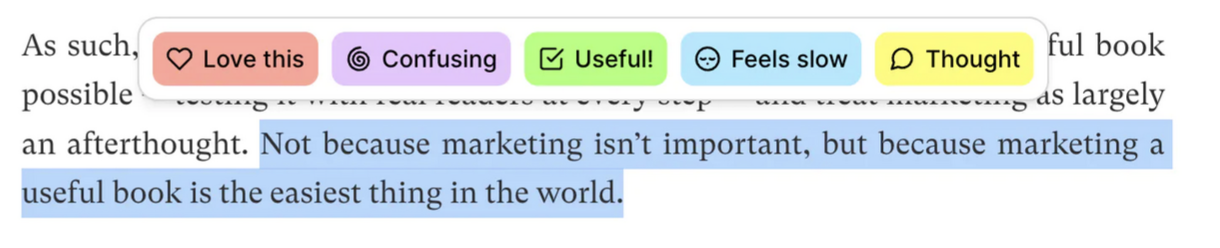
In this screenshot, the reader has highlighted a sentence and is being prompted for what kind of feedback they want to provide. After they click on an icon (like “Confusing”, they’ll be able to type in their comment).
but Help This Book didn’t work with images
My zines aren’t text, so this kind of Google Docs-style interface where you highlight text wouldn’t really work for me.
So in 2021 I asked Marie if they would help me build a custom site to collect feedback on zines, very heavily inspired by Help This Book.
The hardest parts were:
- Deciding the categories of feedback we wanted to ask for from readers
- Designing the site
As usual, actually writing the code was the easy part, so I’m not going to talk about that.
categories help guide people’s feedback
Before I talk about the feedback categories we chose, I want to talk about why feedback categories are so important.
In the “Help This Book” interface (and in the interface of the tool we build), the categories help guide people’s feedback – before someone even starts writing, they need to click on a category for the feedback.
This is helpful for a few reasons:
- It helps remove types of feedback we don’t want. For example, there’s no category for “this is a typo”, because we don’t want people to point out typos – that’s the copy editor’s job :)
- It guides people to phrase their feedback in a form that’s easier to take action on. For example: “I love this” feedback generally doesn’t require any action, but if someone says “This is confusing”, we probably need to clarify something.
- We can easily group similar kinds of feedback together and deal with them all at once. For example, if a bunch of people have left “Confusing” feedback on a page, we can look at that all at once.
How we started: read existing feedback
We figured out the categories by looking at feedback I’d gotten on previous zines and trying to categorize it. Here are the 5 categories we ended up with.
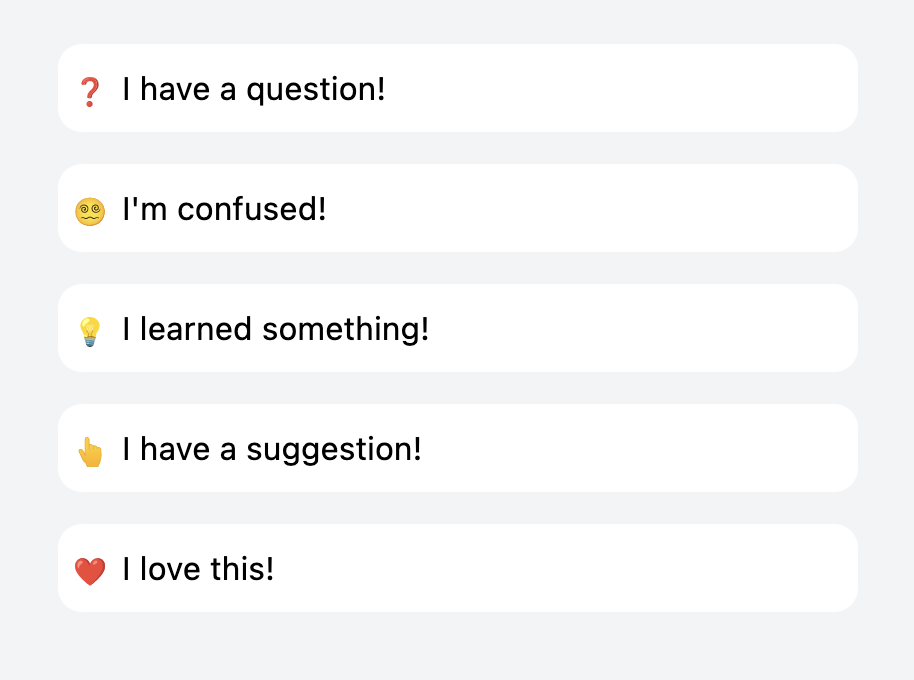
category 1: “I learned something”
The whole goal of the zines is to teach people things, so “I learned something!” is kind of the gold star. If we’re getting this kind of feedback, we’re doing our job.
category 2: “I love this”
We noticed a lot of feedback where the person didn’t specifically say that they learned anything, but just seemed to like the page.
I was originally kind of against this category (“the point is for people to learn things!“), but we ended up including this because there was a lot of this type of feedback and I’m super happy we did.
It’s always very encouraging to see all the hearts, and usually we just take it as a signal that we should keep that page.
category 3: “I have a question”
The idea here is to gather specific questions about something the reader didn’t understand. For example, here are some of the excellent questions readers left on early drafts of the How DNS Works:
- what is a “domain”?
- why do we need to map a domain name to an IP address?
- are these all the DNS record types?
- are the DNS query and response between resolver (function) and resolver (server) the exact same format as between resolver (server) and authoritative nameservers?
- do authoritative nameservers push updates to resolvers or do resolvers “check” frequently to update their caches?
- does my local computer cache DNS query responses at all?
- is the resolver built into the browser or is this a server the browser knows to go and query?
Questions aren’t always a bad thing – sometimes the question indicates that the reader understood the topic well, is curious, and has some followup questions that are outside of the scope of the zine.
But lot of these questions were definitely questions that we wanted the zine to answer, and we mostly took them as a sign that the explanations needed to be improved.
category 4: “I’m confused”
This was a category we actually didn’t have in our first version. But we noticed that we were getting a lot of suggestions that essentially amounted to “I’m confused”.
What we realized was – sometimes an explanation is so confusing that the reader isn’t able to formulate a specific question about what they don’t understand. Figuring out a specific question is hard, especially if the explanation you’re reading isn’t very clear!
A few great examples of “I’m confused” feedback on “How DNS Works”:
- I don’t get the last section in the response record, the “glue records”
- This section is over my head…
- I would really appreciate some kind of simple index on what types of NS records exist and how they relate.
- I didn’t see where SOA records were defined. Did I miss something earlier or later?
- I was confused here by the server word again, due to it being able to refer to a resolver / nameserver. In this case, server => resolver
People also leave a lot of feedback of the form “I was initially confused by X, but then I figured it out”, which is great.
category 5: “I have a suggestion”
The last category is a kind of catchall “other” category for anything that doesn’t fit in the others. We usually ask people not to point out typos or mistakes, but sometimes people do anyway, which is fine.
we listen to learners, not experts
The goal is to get beta reader feedback from people who are trying to learn the material, not from experts.
Because of this, we’ll almost always prioritize “I’m confused” or “I have a question” feedback over “I have a suggestion” feedback, unless the person leaving the suggestion is someone who I know and whose judgement I trust.
If beta readers are learning things and they’re not too confused – we’re doing our job! It’s working!
Technical review and copy editing come at the end of the process, and I’m not going to talk about them in this post.
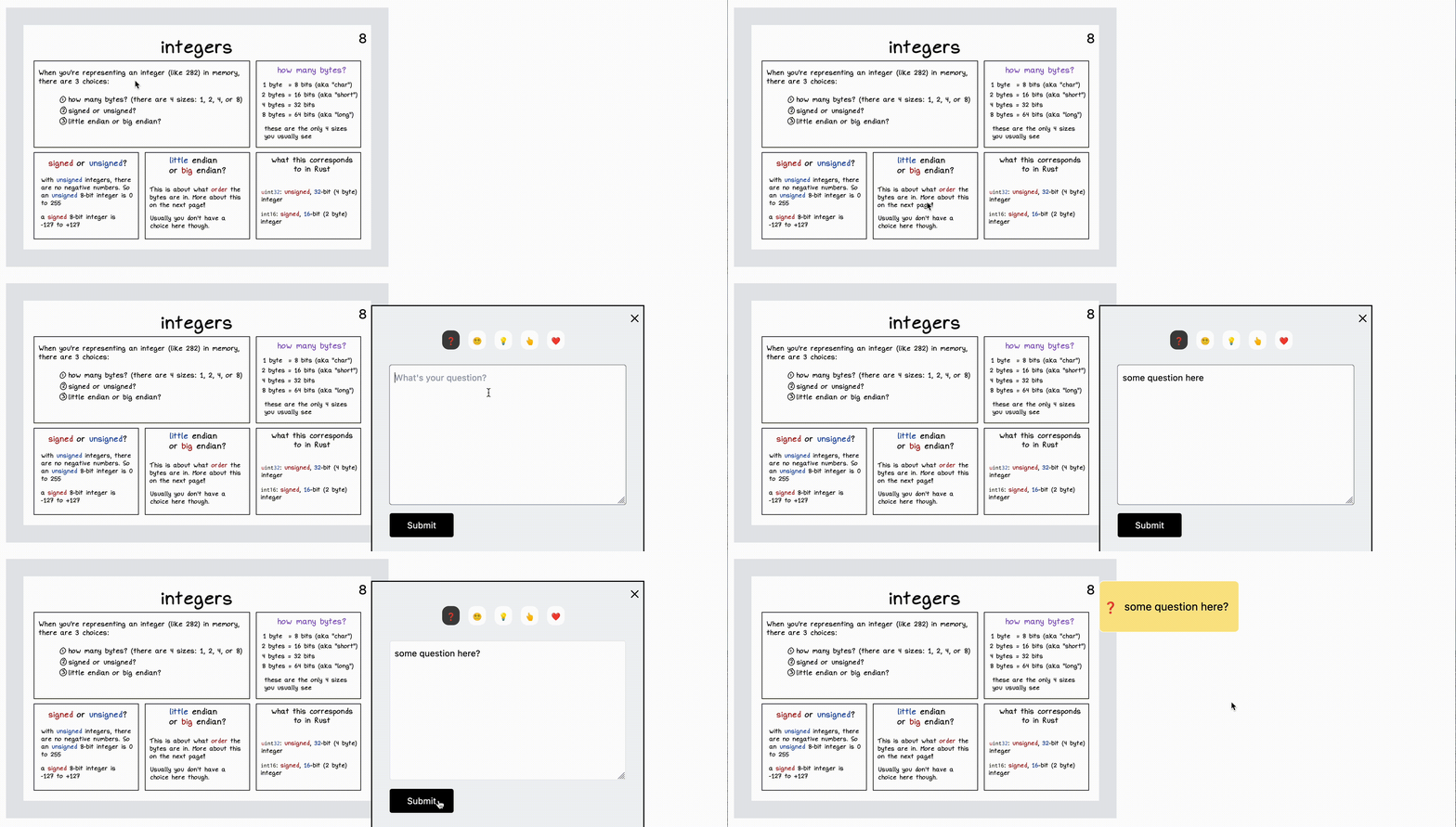
a gif of the zine feedback site
Here’s what the feedback site looks like as a beta reader:
Here’s a screenshot of all the feedback categories:
the admin interface
Next, there’s an admin interface where I
- check off comments as they’re handled
- add my own comments
I’m going to share a couple of examples of pages from the admin section, one where I think the feedback is more positive than the other.
Both of these pages are from a VERY early draft, and they’ve already been edited quite a bit :)
a “good” page
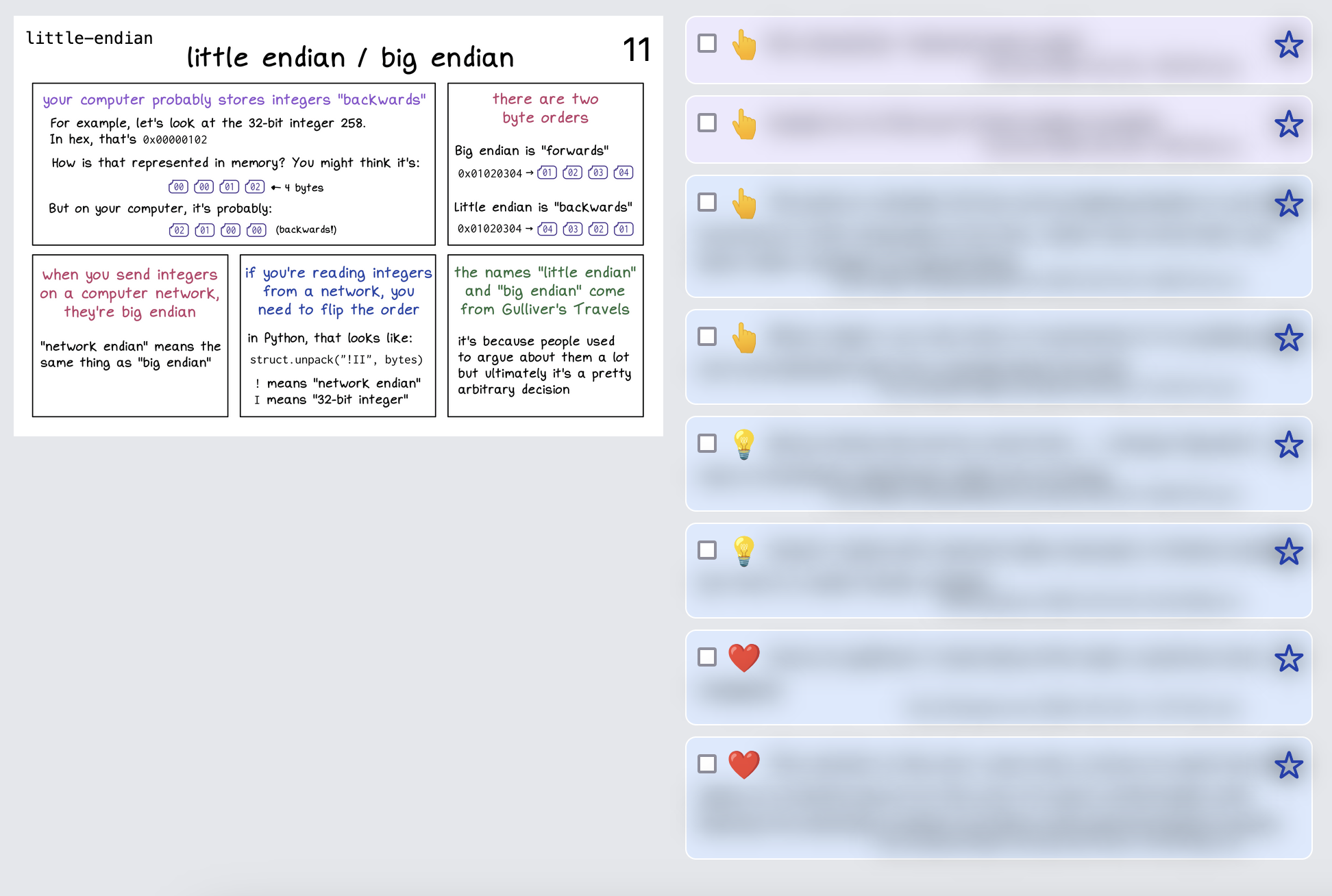
I’ve blurred out all the comments, but the important thing here is the emojis: there are a couple of lightbulbs (“I learned something!”) and a couple of hearts (“I love this!”).
Even without reading anything, this tells me that this page has some promise – there are definitely things to be improved, but people like it.
positive emojis are incredibly helpful
Being able to quickly scan through the zine and say “okay, this has 10 hearts and 7 lightbulbs, obviously people love this page” is amazing: it makes it really easy to tell when a page is working.
This is good because:
- it tells us what we don’t need to work on
- it’s motivating (“we’re getting somewhere! people like this!”)
a “bad” page
Next, here’s an example of another page in the admin interface where things aren’t going so well.
You’ll notice this page only has question marks and suggestions. (the ones in purple are comments that I wrote, the ones in blue are from readers)
The comments are blurred out, but several of them are about how the Rust panel seems arbitrary. That was something I kind of knew already, but hearing it from readers is really helpful and helps me know that I should prioritize fixing it.
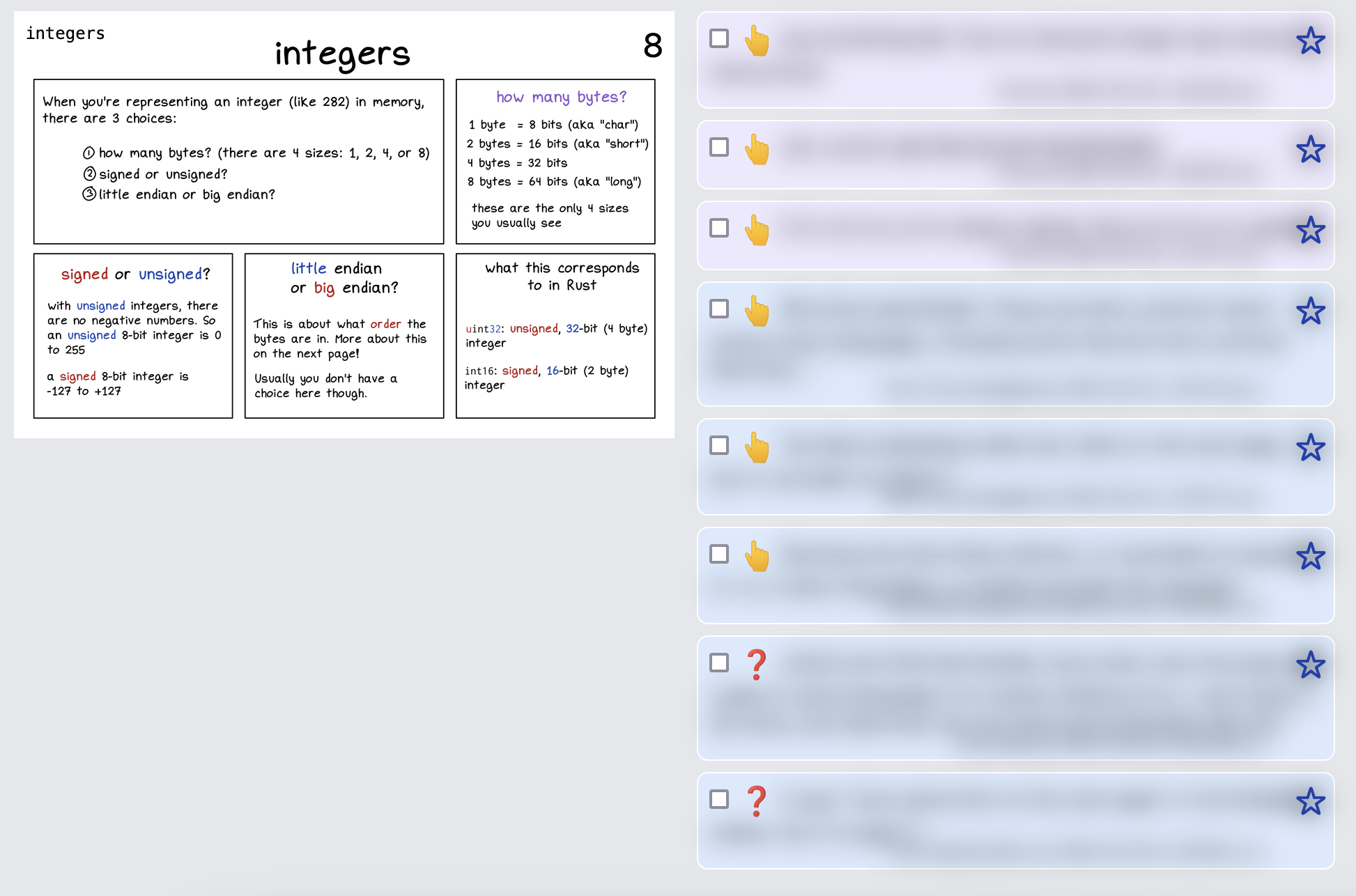
confusion emojis are also super helpful
If we see a lot of “I’m confused” and “I have a suggestion” emojis on a page, that’s also very useful!
Sometimes we’ll react to that by totally rewriting or deleting a page, and then doing another round of feedback to see if the problems have been fixed.
“I have a question” emojis aren’t always a bad thing – sometimes the question indicates that the reader understood the topic well, is curious, and has some followup questions that are outside of the scope of the zine.
pages with no feedback
There are usually one or two pages that get no comments at all from beta readers. A couple of ways we handle this:
- ask a trusted friend for their take on the page
- post it to Mastodon or Twitter and see what the comments are like
- follow our gut (“no, I think this is important, let’s keep it”)
overall feedback
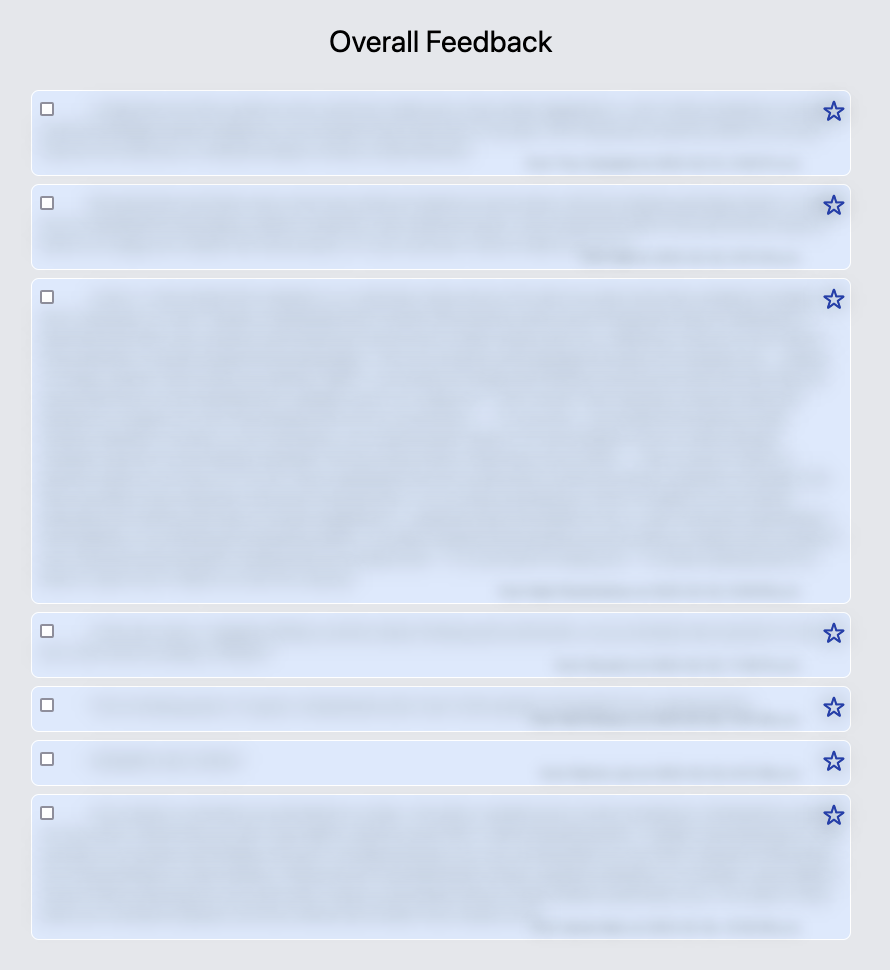
Readers can also enter overall feedback at the end. Here’s what that looks like in the admin interface (again blurred out).
This is a super useful section – sometimes people will leave comments here like “I didn’t really understand X”, and it’ll make it clear that we really need to improve the explanation of X.
the tech stack
I said earlier that writing the code was the easy part so I won’t talk about the code too much. Here are a few facts about the tech stack though. It has:
- a Go backend (which becomes a static binary)
- a SQLite database
- a Vue.js frontend
- a DigitalOcean server
some more notes on how it works:
- all of the zine pages are committed into the Git repository and compiled into the Go binary. (It might be smarter to store them in the database instead, but I didn’t do that, maybe one day!)
- the pages are password-protected, and I email people the password when I ask them for feedback
- when I want to deploy, I rebuild the Go binary locally (using tinybuild), scp it to the DigitalOcean server, and restart the systemd process.
It’s not open source and nobody else can use it because it’s very heavily customized to my use case, completely undocumented, and I made the questionable design choice to store all of the zine pages in the git repository :). I occasionally think about improving it so that other people can use it, but I think there’s a strong change I will never feel motivated to do that.
having a dedicated site for feedback has made a huge difference
We originally built this site in summer 2021, and so far have used it for How DNS Works, The Pocket Guide to Debugging, and the currently-in-progress zine on how computers represent data in binary in memory.
It’s made it possible to get feedback from dozens of people instead of just 3 or 4, and I think it’s really improved the zines’ quality.