Reading List
The most recent articles from a list of feeds I subscribe to.
New playground: integer.exposed
Hello! For the last few months we’ve been working on a zine about how integers and floating point numbers work. Whenever I make a zine I like to release a playground to go with it, like mess with dns for the DNS zine or the sql playground.
For this one, I made a simple playground called integer.exposed, inspired by Bartosz Ciechanowski’s float.exposed.
It’s a lot less elaborate than Mess With DNS, so I’ll keep this blog post short.
the inspiration: float.exposed
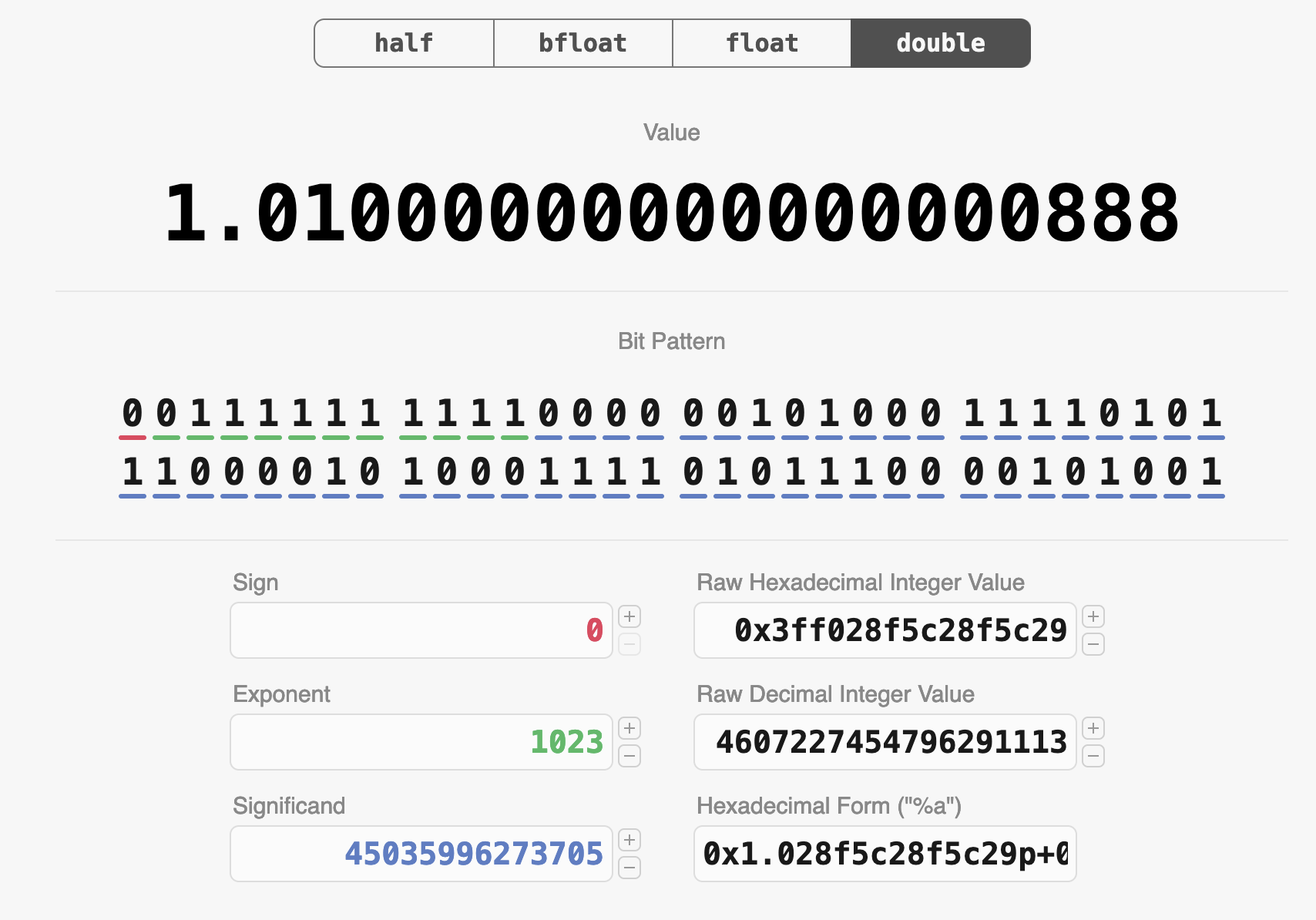
I did a couple of talks about how integers and floating point work last month, and in the talk about floating point I found myself CONSTANTLY referring to this site called Float Exposed by Bartosz Ciechanowski to demonstrate various things. (Aside: If you haven’t seen Ciechanowski’s incredible interactive explainers on bicycles, mechanical watches, lenses, the internal combustion engine, and more, you should check them out!)
Here’s what it it looks like:
Things I’ve done with it:
- Increment the significand of a float (to show people how close together successive floats are)
- Show special values like NaN and infinity, and show how if you change the bits in NaN, it’s still NaN
- Go to a large integer value and show how the distance between floats is very large
- Show how you get drastically different precision for one million as a 32-bit float and as a 64-bit float (try incrementing the significand for each one!)
and lots more! It’s an incredible way to get hands on with floats and improve your intuition around how they work.
float.exposed, but for integers
Integers aren’t as complicated as floats, but there are some nonobvious things about them: you have signed integers and unsigned integers, you have endianness, and there are some weird operations like right/left shift. So when I was talking about integers, I found myself wanting a similar website to float.exposed to demonstrate things.
So with permission, I put one together at integer.exposed. Here’s a screenshot:
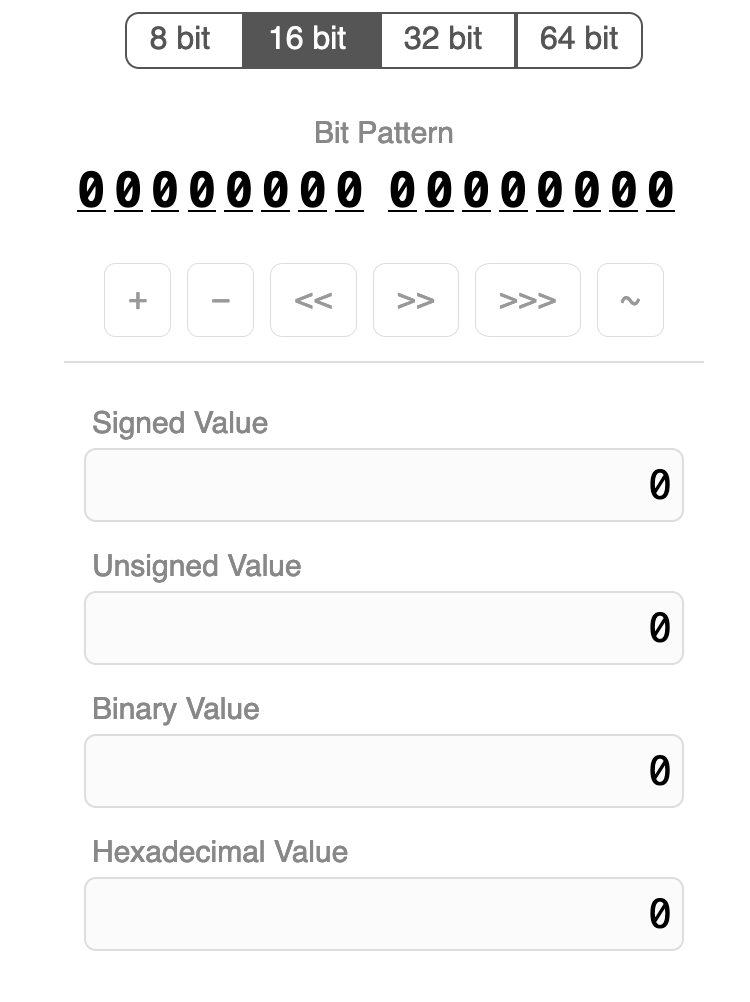
The UI is a little different: integers don’t have many different parts the way floating point numbers do, so there’s a single row of buttons that you can use to do various operations on the integer.
A note on byte order: Like float.exposed, it uses a big endian byte order, because I think it’s more intuitive to read. But you do have to keep in mind that on most computers the bytes will actually be in the reverse order.
some interesting things to try
Here are some things I think are fun to try:
- signed integers: Look at how -1 is represented. Increment and decrement it a few times and see how the signed and unsigned values change. Do the same with -128. Also look at how -1 is represented as a 16/32/64-bit integer.
- signed/unsigned right shift: Similarly with -1: try out signed right shift (also known as “arithmetic right shift”) and see how the result is different from unsigned right shift (aka “logical right shift”).
- counting in binary: Start at 0 and increment a bunch of times and watch the binary value count up.
- not: Take any number (like 123) and NOT it. See how
NOTis almost exactly the same as negation, but not quite. - swap the byte order. Take a number like 12345678 and see how if you swap the byte order, the result is an unrecognizably different number.
- look at how powers of 2 are represented
the tech stack
As usual for me it uses Vue.js. If you want to see how it works you can just
view source – it’s only two files, index.html and script.js.
I took a bunch of the CSS from float.exposed.
that’s all!
Let me know if you notice any bugs! I might add more features, but I want to keep it pretty simple.
I’ve also built another more involved playground that I’m hoping to release and write up soon.
Comparing two database columns in Laravel
When you want to compare two database columns in Laravel, you can’t use where because it treats the argument you’re comparing to as a value.
Instead, Laravel has a whereColumn method you can use to compare a value to another column’s value.
// Retrieve posts that were updated after
// they were published.
Post::query()
->whereColumn('updated_at', '>', 'published_at')
->get();A list of programming playgrounds
I really like using (and making!) programming playgrounds, and I got thinking the other day about how I didn’t have a great list of playgrounds to refer to. So I asked on Mastodon for links to cool playgrounds.
Here’s what I came up with. I’d love to know what I missed.
- Compilers: godbolt compiler explorer by Matt Godbolt
- Shaders: shadertoy by Inigo Quilez and Pol Jeremias
- Arduino / IoT: wokwi from CodeMagic
- CSS/HTML/JS: CodePen by Chris Coyier, Alex Vasquez, and team
- CSS/HTML/JS: JSFiddle by Oskar Krawczyk and Piotr Zalewa
- CSS/HTML/JS: flems by Rasmus Porsager (saves all state in the URL)
- regular expressions:
- DNS: Mess With DNS by Julia Evans and Marie Flanagan
- DNS: DNS lookup tool by Julia Evans
- nginx: nginx playground by Julia Evans
- varnish: fastly fiddle from fastly
- SQLite: sqlime by Anton Zhiyanov (lets you load arbitrary SQLite databases)
- SQL: DB fiddle from Status200
- SQL: sql playground by Julia Evans
- Postgres: postgres playground from Crunchydata (runs postgres in the browser!)
- Git: oh my git by blinry and bleeptrack
- .NET bytecode: SharpLab by Andrey Shchekin
- Python bytecode: dis this by Pamela Fox
data formats
- Floating point: Float Exposed by Bartosz Ciechanowski
- Unicode: Unicode analyzer from fontspace
- Unicode: What unicode character is this? from babelstone
- ASN.1 certificates: ASN.1 JavaScript debugger by Lapo Luchini
- SVG: sssvg (interactive SVG reference) from fffuel (lots of other cool tools there)
- CBOR: CBOR playground
- JSON: JSON editor online by Jos de Jong
- cron: crontab guru from cronitor
programming languages
- official playgrounds:
- unofficial playgrounds:
- PHP: 3v4l by Sjon Hortensius
- Python/JS/C/C++/Java: Python Tutor by Philip Guo
- Javascript: JS Console by @rem
- many languages: riju by Radon Rosborough
- many languages: replit
- others: jqplay for jq, tryapl for APL
Brainstorming as distraction
I saw a blurred video of a prisoner of war being beheaded last week. I’ve seen many images of war over the last >1 year, and none have affected me quite like this one. I don’t go out actively looking for these things, but I read different news channels and you end up seeing some things. As I described to someone else earlier, I think it’s the sound that did it. I had trouble explaining what I meant exactly, so I figured writing out the explanation might set it straighter in my head.
Brainstorming as distraction
I saw a blurred video of a prisoner of war being beheaded last week. I’ve seen many images of war over the last >1 year, and none have affected me quite like this one. I don’t go out actively looking for these things, but I read different news channels and you end up seeing some things. As I described to someone else earlier, I think it’s the sound that did it. I had trouble explaining what I meant exactly, so I figured writing out the explanation might set it straighter in my head.