Reading List
The most recent articles from a list of feeds I subscribe to.
Positioning anchored popovers
Popovers are commonly positioned relative to their invoker (if they have one). When we use the popover attribute, anchoring is tricky, as these popovers are in the top layer, away from the context of their invoker. What options do we have?
See also: Hidde's talk on popovers, and other posts about popover accessibility, positioning popovers and the difference with dialogs and other components.
Basically, there are two ways to position popovers: one you can use today and one that will be available in the future. I'll detail them below, but first, let's look at why we can't use absolute positioning relative to a container shared by the invoker and the popover.
Not all popovers are anchored, but I expect anchored popovers to be among the most common ones. For popovers that are not anchored, such as toast-like elements, “bottom sheets” or keyboard-triggered command palettes, these positioning constraints do not apply.
 Examples of anchored popovers: map toggletip (Extinction Rebellion), date picker (European Sleeper), colour picker (Microsoft Word web app)
See also my other posts on popovers:
- Dialogs and popovers seem similar. How are they different
- Semantics and the popover attribute: what to use when?
- On popover accessibility: what the browser does and doesn't do (with Scott O'Hara)
Top layer elements lose their positioning context
One of the unique characteristics of popovers (again, the ones made with the popover attribute, not just any popover from a design system), is that they get upgraded to the top layer. The top layer is a feature drafted in CSS Positioning, Level 4. The top layer is a layer adjacent to the main document, basically like a bit like a sibling of <html>.
Some specifics on the top layer:
- It's above all
z-indexes in your document, top layer elements can't usez-index. Instead, elements are stacked in the order they are added to the top layer. - As developers, we can't put elements in the top layer directly, as it is browser controlled. We can only use certain elements and APIs that then trigger the browser to move an element to the top layer: the Full Screen API,
<dialog>s withshowModal()andpopover'ed elements, currently. - Top layer elements, quoting the specification, “don't lay out normally based on their position in the document”.
When I positioned my first popover, I tried (and failed): I put both the popover and its invoking element in one element with position: relative. Then I applied position: absolute to the popover, which I hoped would let me position relative to the container. It didn't, and I think the last item above explains why.
In summary, elements lose their position context when they are upgraded to the top layer. And that's okay, we have other options.
Option 1: position yourself (manually or with a library)
The first option is to position the popover yourself, with script. Because the fact that the top layer element doesn't know about the non-top layer element's position in CSS, doesn't mean you can't store the invoker's position and calculate a position for the popover itself.
There are some specifics to keep in mind, just like with popovers that are built without the popover attribute: what happens when there's no space or when the popover is near the window? Numerous libraries can help with this, such as Floating UI, an evolution of the infamous Popper library.
Let's look at a minimal example using Floating UI. It assumes you have a popover in your HTML that is connected to a button using popovertarget:
<button popovertarget="p">Toggle popover</button>
<div id="p" popover>… popover contents go here</div>
By default, browsers show the open popover in the center of the viewport:
 The popover is centered
The reason that this happens is that the UA stylesheet applies margin: auto to popovers. This will reassign any whitespace around the popover equally to all sides as margins. That checks out: if there's the same amount of whitespace left and right, it element will effectively be in the center horizontally (same for top and bottom, but vertically).
For anchored popovers, we want the popover to be near the button that invoked it, not in the center. Let's look at a minimal code example.
In your JavaScript, first import the computePosition function from @floating-ui:
import { computePosition } from '@floating-ui/dom';Then, find the popover:
const popover = document.querySelector('[popover]');Popovers have a toggle event, just like the <details> element, which we'll listen to:
popover.addEventListener('toggle', positionPopover); In our positionPopover function, we'll find the invoker, and then, if the newState property of the event is open, we'll run the computePosition function and set the results of its computation as inline styles.
function positionPopover(event) {
  const invoker = document.querySelector(`[popovertarget="${popover.getAttribute('id')}"`);

  if (event.newState === 'open') {
    computePosition(invoker, popover).then(({x, y}) => {
      Object.assign(popover.style, {
        left: `${x}px`,
        top: `${y}px`,
      });
    });
  }
}
To make this work, I also applied these two style declarations to the popover:
margin: 0, because the UA's auto margin's whitespace gets included in the calculation, with0we remove that whitespaceposition: absolute, because popovers getposition: fixedfrom the user agent stylesheet and I don't want that on popovers that are anchored to a button
It then looks something like this:
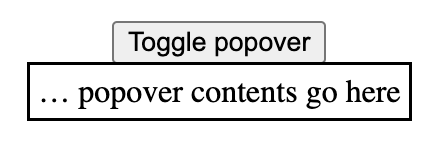
See it in action: Codepen: Positioning a popover with Floating UI.
In the Codepen, I also use some Floating UI config to position the popover from the left. In reality, you probably want to use more of Floating UI's features, to deal with things like resizing (see their tutorial).
Option 2: with Anchor Positioning
To make all of this a whole lot easier (and leave the maths to the browser), a new CSS specification is on the way: Anchor Positioning, Level 1. It exists so that:
a positioned element can size and position itself relative to one or more "anchor elements" elsewhere on the page
This, as they say, is rad, because it will let the browser do your sizing and positioning maths (even automatically- update 4 May 2024: looks like automatic anchoring was removed). It is also exciting, because it doesn't care where your elements are. They can be anywhere in your DOM. And, important for popovers, it also works across the top layer and root element.
Though popovers would get implicit anchoring, you can connect a popover with its invoker via CSS. To find out how all of this works in practice, I recommend Jhey Tompkins's great explainer on Chrome Developers (but note it's currently somewhat outdated, the editor's draft spec changed since that post, and has new editors). Roman Komarov covers his experiments and some interesting use cases in Future CSS: Anchor Positioning, and also wrote Anchor Positioning on 12 days of web.
The Anchor Positioning spec was recently updated, and is currently in the process of being implemented in browsers, hence the Option 1 in this article. But, excitingly, it is in the works. Chromium has already issued an intent to ship anchor positioning, and so did Mozilla/Gecko. The recent updates are still pending TAG review.
Wrapping up
So, in summary: if your popover needs to be anchored to something, like a button or a form field, you can't “just” use absolute positioning. Instead, you can use JavaScript (today), or, excitingly, anchor positioning (in the near-ish future, an Editor's Draft in CSS was published last year and a new version of that with new editors was released in April 2024.
Originally posted as Positioning anchored popovers on Hidde's blog.
The ElasticSearch Rant


As a part of my continued efforts to heal, one of the things I've been trying to do is avoid being overly negative and venomous about technology. I don't want to be angry when I write things on this blog. I don't want to be known as someone who is venomous and hateful. This is why I've been disavowing my articles about the V programming language among other things.
ElasticSearch makes it difficult for me to keep this streak up.
I have never had the misfortune of using technology that has worn down my sanity and made me feel like I was fundamentally wrong about my understanding about computer science like I have with ElasticSearch. Not since Kubernetes, and I totally disavow using Kubernetes now at advice of my therapist. Maybe ElasticSearch is actually this bad, but I'm so close to the end that I feel like I have no choice but to keep progressing forward.
This post outlines all of my suffering getting ElasticSearch working for something at work. I have never seen suffering quite as much as this and I am now two months into a two week project. I have to work on this on fridays so that I'm not pissed off and angry at computers for the rest of the week.
Buckle up.
For doublerye to read only

Limbo
ElasticSearch is a database I guess, but the main thing it's used for is as a search engine. The basic idea of a search engine is to be a central aggregation point where you can feed in a bunch of documents (such as blogposts or knowledge base entries) and then let users search for words in those documents. As it turns out, most of the markdown front matter that is present in most markdown deployments combined with the rest of the body reduced to plain text is good enough to feed in as a corpus for the search machine.
However, there was a slight problem: I wanted to index documents from two projects and they use different dialects of Markdown. Markdown is about as specified as the POSIX standard and one of the dialects was MDX, a tool that lets you mix Markdown and React components. At first I thought this was horrifying and awful, but eventually I've turned around on it and think that MDX is actually pretty convenient in practice. The other dialect was whatever Hugo uses, but specifically with a bunch of custom shortcodes that I had to parse and replace.
Turns out writing the parser that was able to scrape out the important bits was easy, and I had that working within a few hours of hacking thanks to judicious abuse of line-by-line file reading.

However, this worked and I was at a point where I was happy with the JSON objects that I was producing. Now, we can get to the real fun: actually using ElasticSearch.
Lust
When we first wanted to implement search, we were gonna use something else (maybe Sonic), but we eventually realized that ElasticSearch was the correct option for us. I was horrified because I have only ever had bad experiences with it. I was assured that most of the issues were with running it on your own hardware and that using Elastic Cloud was the better option. We were also very lucky at work because we had someone from the DevRel team at Elastic on the team. I was told that there was this neat feature named AppSearch that would automatically crawl and index everything for us, so I didn't need to write that hacky code at all.
So we set up AppSearch and it actually worked pretty well at first. We didn't have to care and AppSearch dilligently scraped over all of the entries, adding them to ElasticSearch without us having to think. This was one of the few parts of this process where everything went fine and things were overall very convenient.
After being shown how to make raw queries to ElasticSearch with the Kibana developer tools UI (which unironically is an amazing tool for doing funky crap with ElasticSearch), I felt like I could get things set up easily. I was feeling hopeful.
Gluttony
Then I tried to start using the Go library for ElasticSearch. I'm going to paste one of the Go snippets I wrote for this, this is for the part of the indexing process where you write objects to ElasticSearch.
data, err := json.Marshal(esEntry)
if err != nil {
	log.Fatalf("failed to marshal entry: %v", err)
}

resp, err := es.Index("site-search-kb", bytes.NewBuffer(data), es.Index.WithDocumentID(entry.ID))
if err != nil {
	log.Fatal(err)
}

switch resp.StatusCode {
case http.StatusOK, http.StatusCreated:
	// ok
default:
	log.Fatalf("failed to index entry %q: %s", entry.Title, resp.String())
}
To make things more clear here: I am using the ElasticSearch API bindings from Elastic. This is the code you have to write with it. You have to feed it raw JSON bytes (which I found out was the literal document body after a lot of fruitless searching through the documentation, I'll get back to the documentation later) as an io.Reader (in this case a bytes.Buffer wrapping the byte slice of JSON). This was not documented in the Go code. I had to figure this out by searching GitHub for that exact function name.


Oh yeah, I forgot to mention this but they don't ship error types for ElasticSearch errors, so you have to json-to-go them yourself. I really wish they shipped the types for this and handled that for you. Holy cow.
Greed
Now you may wonder why I went through that process if AppSearch was working well for us. It was automatically indexing everything and it should have been fine. No. It was not fine, but the reason it's not fine is very subtle and takes a moment to really think through.
In general, you can break most webpages down into three basic parts:
- The header which usually includes navigation links and the site name
- The article contents (such as this unhinged rant about ElasticSearch)
- The footer which usally includes legal overhead and less frequently used navigation links (such as linking to social media).
When you are indexing things, you usually want to index that middle segment, which will usually account for the bulk of the page's contents. There's many ways to do this, but the most common is the Readability algorithm which extracts out the "signal" of a page. If you use the reader view in Firefox and Safari, it uses something like that to break the text free from its HTML prison.
So, knowing this, it seems reasonable that AppSearch would do this, right? It doesn't make sense to index the site name and navigation links because that would mean that searching for the term "Tailscale" would get you utterly useless search results.
Guess what AppSearch does?

Even more fun, you'd assume this would be configurable. It's not. The UI has a lot of configuration options but this seemingly obvious configuration option wasn't a part of it. I can only imagine how sites use this in practice. Do they just return article HTML when the AppSearch user-agent is used? How would you even do that?
I didn't want to figure this out. So we decided to index things manually.
Anger
So at this point, let's assume that there's documents in ElasticSearch from the whole AppSearch thing. We knew we weren't gonna use AppSearch, but I felt like I wanted to have some façade of progress to not feel like I had been slipping into insanity. I decided to try to search things in ElasticSearch because even though the stuff in AppSearch was not ideal, there were documents in ElasticSearch and I could search for them. Most of the programs that I see using ElasticSearch have a fairly common query syntax system that lets you write searches like this:
author:Xe DevRel
And then you can search for articles written by Xe about DevRel. I thought that this would rougly be the case with how you query ElasticSearch.
Turns out this is nowhere near the truth. You actually search by POST-ing a JSON document to the ElasticSearch server and reading back a JSON document with the responses. This is a bit strange to me, but I guess this means that you'd have to implement your own search DSL (which probably explains why all of those search DSLs vaguely felt like special snowflakes). The other main problem is how ElasticSearch uses JSON.
To be fair, the way that ElasticSearch uses JSON probably makes sense in Java or
JavaScript, but not in Go. In Go
encoding/json expects every JSON field to
only have one type. In basically every other API I've seen, it's easy to handle
this because most responses really do have one field mean one thing. There's
rare exceptions like message queues or event buses where you have to dip into
json.RawMessage to use JSON
documents as containers for other JSON documents, but overall it's usually fine.
ElasticSearch is not one of these cases. You can have a mix of things where simplified things are empty objects (which is possible but annoying to synthesize in Go), but then you have to add potentially dynamic child values.

Go's type system is insufficiently typeful to handle the unrestrained madness that is ElasticSearch JSON.
When I was writing my search querying code, I tried to use mholt's excellent json-to-go which attempts to convert arbitrary JSON documents into Go types. This did work, but the moment we needed to customize things it became a process of "convert it to Go, shuffle the output a bit, and then hope things would turn out okay". This is fine for the Go people on our team, but the local ElasticSearch expert wasn't a Go person.
Then my manager suggested something as a joke. He suggested using
text/template to generate the correct JSON
for querying ElasticSearch. It worked. We were both amazed. The even more cursed
thing about it was how I quoted the string.
In text/template, you can set variables like this:
{{ $foo := <expression> }}
And these values can be the results of arbitrary template expressions, such as
the printf function:
{{ $q := printf "%q" .Query }}
The thing that makes me laugh about this is that the grammar of %q in Go is
enough like the grammar for JSON strings that I don't really have to care
(unless people start piping invalid Unicode into it, in which case things will
probably fall over and the client code will fall back to suggesting people
search via Google). This is serendipidous, but very convenient for my usecase.
If it ever becomes an issue, I'll probably encode the string to JSON with
json.Marshal, cast it to a string,
and then have that be the thing passed to the template. I don't think it will
matter until we have articles with emoji or Hanzi in them, which doesn't seem
likely any time soon.

Treachery
Another fun thing that I was running into when I was getting all this set up is that seemingly all of the authentication options for ElasticSearch are broken in ways that defy understanding. The basic code samples tell you to get authentication credentials from Elastic Cloud and use that in your program in order to authenticate.
This does not work. Don't try doing this. This will fail and you will spend hours ripping your hair out because the documentation is lying to you. I am unaware of any situation where the credentials in Elastic Cloud will let you contact ElasticSearch servers and overall this was really frustrating to find out the hard way. The credentials in Elastic Cloud are for programmatically spending up more instances in Elastic Cloud.

ElasticSeach also has a system for you to get an API key to make requests against the service so that you can use the principle of least privilege to limit access accordingly. This doesn't work. What you actually need to do is use username and password authentication. This is the thing that works.
Then I found out that the ping API call is a privileged operation and you need administrative permissions to use it. Same with the "whoami" call.


Really though, that last string of "am I missing something fundamental about how database design works or am I incompetent?" thoughts is one of the main things that has been really fucking with me throughout this entire saga. I try to not let things that I work on really bother me (mostly so I can sleep well at night), but this whole debacle has been very antithetical to that goal.
Blasphemy
Once we got things in production in a testing capacity (after probably spending a bit of my sanity that I won't get back), we noticed that random HTTP responses were returning 503 errors without a response body. This bubbled up weirdly for people and ended up with the frontend code failing in a weird way (turns out it didn't always suggest searching Google when things fail). After a bit of searching, I think I found out what was going on and it made me sad. But to understand why, let's talk about what ElasticSearch does when it returns fields from a document.
In theory, any attribute in an ElasticSearch document can have one or more values. Consider this hypothetical JSON document:
{
  "id": "https://xeiaso.net/blog/elasticsearch",
  "slug": "blog/elasticsearch",
  "body_content": "I've had nightmares that are less bad than this shit",
  "tags": ["rant", "philosophy", "elasticsearch"]
}
If you index such a document into ElasticSearch and do a query, it'll show up in your response like this:
{
  "id": ["https://xeiaso.net/blog/elasticsearch"],
  "slug": ["blog/elasticsearch"],
  "body_content": ["I've had nightmares that are less bad than this shit"],
  "tags": ["rant", "philosophy", "elasticsearch"]
}
And at some level, this really makes sense and is one of the few places where ElasticSearch is making a sensible decision when it comes to presenting user input back to the user. It makes sense to put everything into a string array.
However in Go this is really inconvenient and if you run into a situation where
you search "NixOS" and the highlighter doesn't return any values for the
article (even though it really should because the article is about NixOS), you
can get a case where there's somehow no highlighted portion. Then because you
assumed that it would always return something (let's be fair: this is a
reasonable assumption), you try to index the 0th element of an empty array and
it panics and crashes at runtime.
Option<T> instead of panicking if the index is out of
bounds like Go does? That design choice was confusing to me, but it makes a lot
more sense now.We were really lucky that "NixOS" was one of the terms that did this behavior,
otherwise I suspect we would never have found it. I did a little hack where it'd
return the first 150 characters of an article instead of a highlighted portion
if no highlighted portion could be found (I don't know why this would be the
case but we're rolling with it I guess) and that seems to work fine...until we
start using Hanzi/emoji in articles and we end up cutting a family in half.
We'll deal with that when we need to I guess.
Thievery
While I was hacking at this, I kept hearing mentions that the TypeScript client was a lot better, mostly due to TypeScript's type system being so damn flexible. You can do the N-Queens problem in the type solver alone!
However, this is not the case and for some of it it's not really Elastic's fault that the entire JavaScript ecosystem is garbage right now. As for why: consider this code:
import * as dotenv from "dotenv";
This will blow up and fail if you try to run it with ts-node. Why? It's
because it's using
ECMAScript Modules
instead of "classic" CommonJS imports. This means that you have to transpile
your code from the code you wish you could write (using the import keyword) to
the code you have to write (using the require function) in order to run it.
Or you can do what I did and just give up and use CommonJS imports:
const dotenv = require("dotenv");
That works too, unless you try to import an ECMAScript module, then you have to
use the import function in an async function context, but the top level
isn't an async context, so you have to do something like:
(async () => {
  const foo = await import("foo");
})();
This does work, but it is a huge pain to not be able to use the standard import syntax that you should be using anyways (and in many cases, the rest of your project is probably already using this standard import syntax).
Anyways, once you get past the undefined authentication semantics again, you can get to the point where your client is ready to poke the server. Then you take a look at the documentation for creating an index.
In case Elastic has fixed it, I have recreated the contents of the
indicies.create function below:
create
Creates an index with optional settings and mappings.
client.indices.create(...)
Upon seeing this, I almost signed off of work for the day. What are the function arguments? What can you put in the function? Presumably it takes a JSON object of some kind, but what keys can you put in the object? Is this library like the Go one where it's thin wrappers around the raw HTTP API? How do JSON fields bubble up into HTTP request parts?
Turns out that there's a whole lot of conventions in the TypeScript client that I totally missed because I was looking right at the documentation for the function I wanted to look at. Every method call takes a JSON object that has a bunch of conventions for how JSON fields map to HTTP request parts, and I missed it because that's not mentioned in the documentation for the method I want to read about.
Actually wait, that's apparently a lie because the documentation doesn't actually spell out what the conventions are.
I had to use ChatGPT as a debugging tool of last resort in order to get things working at all. To my astonishment, the suggestions that ChatGPT made worked. I have never seen anything documented as poorly as this and I thought that the documentation for NixOS was bad.

Fin
If your documentation is bad, your user experience is bad. Companies are usually cursed to recreate copies of their communication structures in their products, and with the way the Elastic documentation is laid out I have to wonder if there is any communication at all inside there.
One of my coworkers was talking about her experience trying to join Elastic as a documentation writer and apparently part of the hiring test was to build something using ElasticSearch. Bless her heart, but this person in particular is not a programmer. This isn't a bad thing, it's perfectly reasonable to not expect people with different skillsets to be that cross-functional, but good lord if I'm having this much trouble doing basic operations with the tool I can't expect anyone else to really be able to do it without a lot of hand-holding. That coworker asked if it was a Kobayashi Maru situation (for the zoomers in my readership: this is an intentionally set up no-win scenario designed to test how you handle making all the correct decisions and still losing), and apparently it was not.
Any sufficiently bad recruiting process is indistinguishable from hazing.
I am so close to the end with all of this, I thought that I would put off finalizing and posting this to my blog until I was completely done with the project, but I'm 2 months into a 2 week project now. From what I hear, apparently I got ElasticSearch stuff working rather quickly (???) and I just don't really know how people are expected to use this. I had an ElasticSearch expert on my side and we regularly ran into issues with basic product functionality that made me start to question how Elastic is successful at all.
I guess the fact that ElasticSearch is the most flexible option on the market helps. When you start to really understand what you can do with it, there's a lot of really cool things that I don't think I could expect anything else on the market to realistically accomplish in as much time as it takes to do it with ElasticSearch.
ElasticSearch is just such a huge pain in the ass that it's making me ultimately wonder if it's really worth using and supporting as a technology.
Standards
Standards are useful, but after a while they represent the beliefs of the past, not the needs of the future.
A good quote from Mathias Verraes on standards.
HTML button form attribute
Thanks to my colleague Sam I recently learned about the form attribute on the <button> element.
By setting a form attribute, the button becomes a submit button for a form on the page with that ID, without having to nest the button on the page.
This could be useful for a logout link, used on different places.
<nav>
<!-- … -->
<button type="submit" form="logout">
Log out
</button>
</nav>
<footer>
<!-- … -->
<button type="submit" form="logout">
Log out
</button>
</footer>
<form id="logout" method="POST" action="/logout">
</form>The grug brained developer
If you’re going to read one thing today, make it this. So much good stuff in here I could quote just any paragraph.
complexity is spirit demon that enter codebase through well-meaning but ultimately very clubbable non grug-brain developers and project managers who not fear complexity spirit demon or even know about sometime […]
grug no able see complexity demon, but grug sense presence in code base