Reading List
The most recent articles from a list of feeds I subscribe to.
Nextpad++
Windows Notepad is, more or less, the Windows peer to MacOS’s TextEdit — the built-in system text editor. For years, it was really basic — more basic than TextEdit. Recently Microsoft has started beefing it up, though, culminating last year when they added fucking Markdown support. Which still blows my mind.
Notepad++ is a longstanding open source (GPL) Windows text editor by Don Ho, which debuted back in 2003. Just adding “++” to the name feels misleading. The name implies that it’s like Microsoft’s Notepad but a little more. Notepad++ is in fact a wholly independent programming text editor, with a rich plugin library, and remains quite popular. To some extent Notepad++ sorta kinda the Windows peer to BBEdit.
Nextpad++ is something new, from Andrey Letov. It’s a Mac port of the Notepad++ GPL code, apparently in Objective-C. It launched a few weeks ago under the name “Notepad++ for Mac”, but Letov had no right or permission to the name. That dispute has been settled, and Letov has renamed this project Nextpad++. The website’s About page has entire sections for “How Nextpad++ for Mac Was Built” and “Technology Stack”, and neither of those mentions AI, but this thing almost has to have been built using AI vibe-coding agents. That same about page also says the project only started on March 10, and the 1.0 version (under the defunct “Notepad++ for Mac” name) shipped just a few weeks after that. Something of the scope of this port couldn’t happen at that pace without AI.
Nextpad++ feels like a fever dream. Like what Mac apps would be if the Nazis had won WWII. Look, there are all sorts of foreign apps on the Mac. Electron apps. Apps ported with Wine. The curious new generation of lean-and-mean apps that are, in a technical sense, “native”, but are decidedly not Mac-assed apps, like Zed and Tolaria. Those apps just feel like aliens on MacOS. Like new species. But the Mac is welcoming to them, like the Mos Eisley cantina. We do serve their kind here. Nextpad++ doesn’t feel like an alien. It feels like Vincent D’Onofrio’s alien-bug-in-human-skin character from Men in Black.
Letov’s website describes it as “A real Mac app, not a Wine wrapper: Objective-C++ on top of Scintilla and Cocoa, shipped as a Universal Binary for Apple Silicon (M1–M5) and Intel Macs.” Ostensibly that’s a good thing. But Nextpad++ looks and feels like something that should not exist. The promotional screenshots on the app’s own website show it with 50 inscrutable toolbar buttons. It closes tabs on mousedown, not mouseup. Its default font is 10-point Courier New. No human being would port a complex Windows app like Notepad++ to the Mac like this.
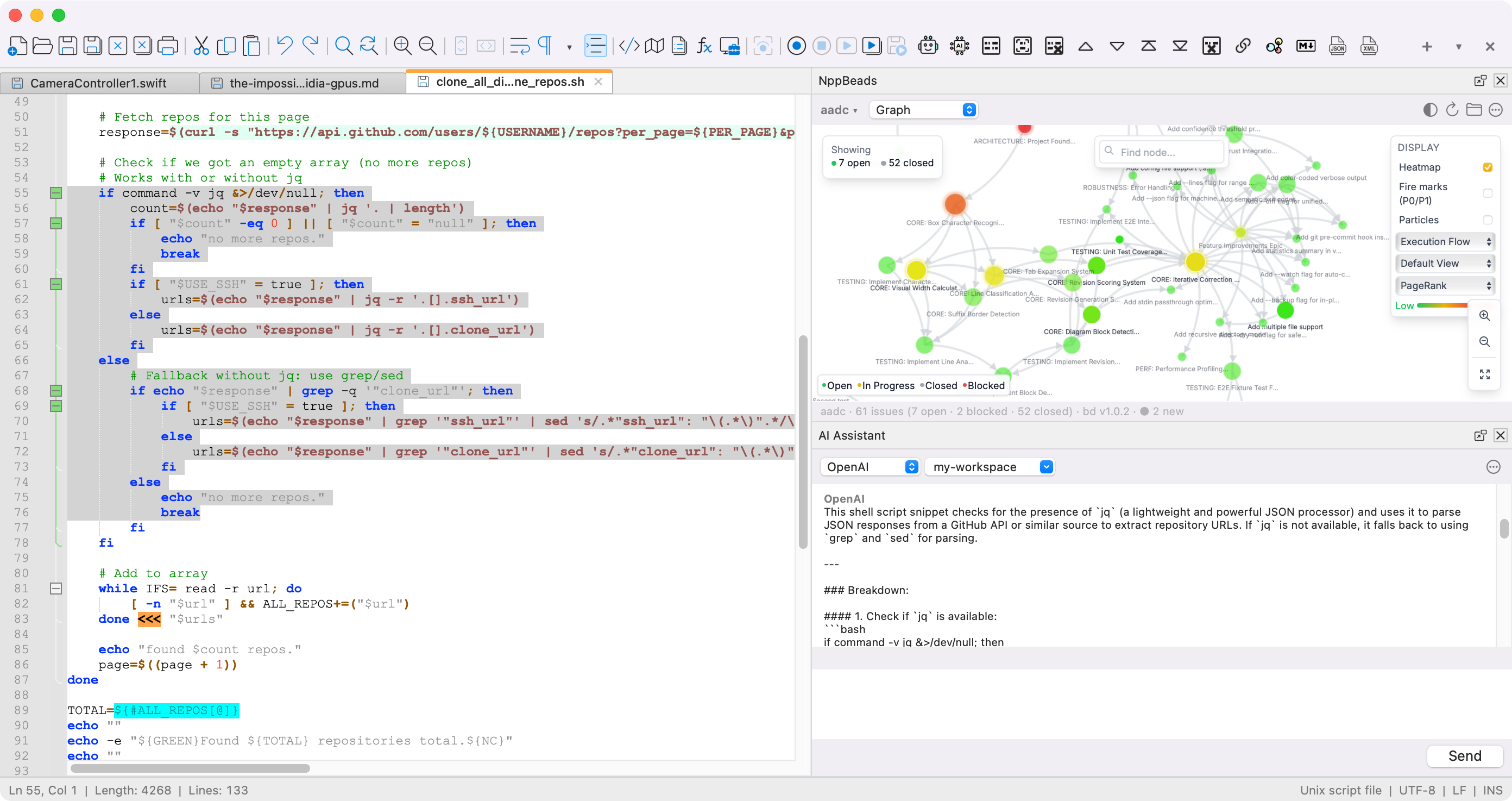
I’m not anti-AI. I’m very much intrigued by the whole incipient vibe-coding phenomenon. But this app feels unholy. It’s spooky.
Kagi Snaps
Kagi’s documentation:
Typing
@r headphoneswill search for “headphones” but limit the results to reddit.com (ris the short code for Reddit). This allows you to quickly find relevant content on a specific site using Kagi’s powerful index. It is effectively the same as doingheadphones site:old.reddit.com.Its relative, Bangs feature, invoked by using “!r headphones”, would redirect the user to Reddit’s internal search.
I learned about the snaps feature from a Kagi blog post a few months ago, and I’ve been loving it ever since. From that post:
You can also use Snaps to quickly search within Kagi’s knowledge base. For example, the
@helpsnap searches the Kagi help docs, handy for when you want to quickly look into a feature.User tip: “I recommend combining Snaps with the “I’m feeling lucky” bang:
!with no short code. Like searching@gh curl !to go to the curl repo.
I’ve never actually looked any of these up. I just guessed at the ones I most want to use and they all worked on the first try. @nyt returns results from The New York Times; @wsj is for The Wall Street Journal. Take a guess what @df does.
And you can add your own custom bangs/snaps in Kagi’s settings. It’s easy. In fact, I created a custom nyt bang/snap shortcut to override Kagi’s default. Kagi’s built-in nyt bang/snap uses the query.nytimes.com subdomain, which is outdated. You get better results just using nytimes.com with no subdomain. [Update: One day after posting this, Kagi has updated their built-in nyt bang/snap to use the top-level nytimes.com domain. Nice.]

Also: Does your preferred search engine have a well-written comprehensive user manual? Kagi does. Good documentation is a tell-tale sign of a great product and a company that puts users first. There exist good products with bad or no documentation, but there are very few poor products with great documentation.
Seriously, Give Kagi a Try
Quoting from a post I wrote a year ago:
Like, even if I use the magic
&udm=14parameter with Google search, to get “disenshittified” results from Google, I find I get better results from Kagi. When I know there’s one right answer (say, a specific article I remember reading and want to find again), Kagi is more likely than Google to list it first. If it’s a years-old article, Kagi is way more likely than Google to find it at all. For me, Google (and, alas, DuckDuckGo too) have largely stopped working reliably for finding not-recent stuff on the web. Not true with Kagi.I used DuckDuckGo for years as my default search, and for those years, I found it largely on par with Google. But it felt like every once in a while — maybe, say, once or twice a month — DuckDuckGo would come up dry in its results. DuckDuckGo pioneered a trick they call Bangs. Include
!gto any search terms, and instead of performing the search itself, DuckDuckGo will redirect that search to Google. They have a whole bunch of these Bangs — “!a” for Amazon search, “!nf” for Netflix. There are literally thousands of them (which of course they allow you to search for). The only one I ever really used though was!g, for redirecting my current search to Google because DuckDuckGo’s own results for the same terms was unsatisfying. My memory may not match with my actual usage, but like I said, I feel like I used this about once or twice a month for the several years I was using DuckDuckGo as my default search engine. Infrequently enough that it didn’t annoy me to the point of considering switching back to Google for default in-browser search, but frequently enough that I was annoyed enough to remember that I needed to use it at all.Kagi supports Bangs too, including
!gfor Google web search. I can’t remember the last time I felt the need to try using it. It’s been months, many months. And, the last few times I’ve tried it, Google’s results were no more help than Kagi’s.
In the year since writing the above, I honestly don’t think I’ve resorted to the !g bang once. For me, Google web search is about as relevant to my life as Yahoo search. Something I used to use, something that used to be better, but which I’ve found a vastly superior alternative to. If Kagi went out of business or changed for the worse, I’d be heartsick. It’s truly one of the best services I’ve used, and it keeps getting better.
Google Search is like watching 2001: A Space Odyssey with a goddamn Febreze ad stuck in the famed match cut. Kagi search is like paying for a streaming service with no ads and higher image quality and better sound. It’s just plain better.
Search Ads as a Vector for Travel Scams
Dawn Gilbertson, writing for The Wall Street Journal (gift link):
Calder says that he tried to rebook at the given link a few times but that it wouldn’t work. He became worried new flight options were dwindling, so he googled the airline’s customer-service number. (There was a link to customer-service contacts way down in the email that he initially overlooked.)
The rest of the story is sadly familiar to the Better Business Bureau, Federal Trade Commission, airlines and consumer advocates. It’s called an impostor scam. This can occur when a company impersonates an airline’s customer-service number or site, often by buying a sponsored ad on a search platform. The company is hoping that panicked consumers trying, say, to rebook a flight will click on the first link they see, bringing them to unscrupulous parties that try to charge exorbitant fees. I’ve written before about such tactics, and they are only becoming more sophisticated with AI.
“Scammers thrive on that sense of urgency,” says John Breyault, a vice president at the National Consumers League whose coverage area includes fraud.
The person who answered Calder’s call identified himself as a Lufthansa representative and asked for the Lufthansa confirmation number. He found new flights on Lufthansa’s partner Air Canada and Austrian Airlines, a Lufthansa Group subsidiary, on the same late-summer dates.
The kicker, which Calder admits in hindsight is a colossal red flag: He had to pay $12,132 to make the change. That’s more than five times the amount of the original tickets.
In addition to airlines, these scammers often impersonate hotels. Yet another reason to try Kagi as your default web search engine. I’m not saying Kagi is scam-proof in its actual search results, but it’s 100 percent resistant to scammers buying search result ads — because they have no ads. With Kagi, you pay a very small subscription fee and in exchange you get better results with zero ads.
Also, another reason to worry about Apple’s upcoming ads in Apple Maps.
Teresa Ribera Visited the U.S. and No One Noticed
Jacob Parry and Laura Greenhalgh, reporting for Politico, one month ago:
The EU’s landmark tech regulations are a “success story” that are beginning to level the playing field between Silicon Valley’s giants and their digital competitors in Europe, said European Competition Commissioner Teresa Ribera on Friday. [...]
Ribera’s comments come as Brussels prepares for a formal review of the DMA to determine what is working and where the law may need to be reformed. The regulation aims to prevent “gatekeeper” firms, including Apple, Alphabet and Meta, from using their dominant positions to stifle competition from smaller players.
The EU’s top antitrust official pushed back against criticism that enforcement has been too slow, arguing that the “rule of law” requires a methodical approach based on evidence and due process. [...]
Ribera recently returned from a diplomatic mission to Washington and Silicon Valley where she met with U.S. officials and tech executives. She said there is a surprising degree of alignment between European and American priorities, despite the differing political climates. In particular, Ribera highlighted a “consistent” dialogue with the U.S. Department of Justice under the current Trump administration.
Again, I only found this story because I went searching for news regarding Teresa Ribera and the DMA after taking note in an earlier post that things have been very quiet on this front for the last year. When Margrethe Vestager visited the U.S. and met with tech executives, it was news. There were press photos. Vestager drew attention to the meetings, and, of course, to herself.

It’s pretty telling that Ribera recently visited both Washington and Silicon Valley and it barely registered in the news. Ribera’s approach to the E.U. competition chief job might actually be focused on genuine competition and consumer welfare, not punishing U.S. companies for their success by weaponizing byzantine layers of bureaucracy that ultimately work against the interests of EU citizens and the stagnant EU economy.