Reading List
The most recent articles from a list of feeds I subscribe to.
Self-deprecating comments
Henrik Nyh suggests to make comments more resilient to change with double-entry bookkeeping.
- $timeoutMs = 1000; // Equals 1 second
+ $timeoutMs = 1000; // 1000ms equals 1 second
Whether the discrepancy is caught immediately by the author, or in review, or by another developer far down the line, it will be explicitly clear that the comment was not intended for the current value.
This lowers the odds that a comment will get out of sync, especially useful in configuration files.
For more context head to Henrik’s blog, The Pug Automatic.
Back at it! Process discovery & a newsletterroll
Hi,
In the beginning of 2021 I decided to tone things down: low blogging activity, not too much open source follow-up, and most importantly a break from Twitter—which I wrote about. With so much to learn and keep up with, an occasional digital fast triggers a necessary reboot.
Process discovery & communication: things I learned at an event storming workshop
Last month I attended an event storming workshop at DDDEU. It was given by the creator of the method, Alberto Brandolini.
In short, event storming is a collection of methods to discover concepts and processes in a business. The main tool: Post-Its.
Since this was remote workshop, Post-Its were replaced by Miro, a realtime collaboration board.
Here are a few things I learned that reach beyond event storming.
When you’re trying to discover how something works, it’s better to have something wrong on paper than having nothing. You’re going to make mistakes in the discovery process anyway. Having something on paper will make it explicit, and will ensure you keep track of it in other places even though when not perfect. It is better to be prescriptive and wrong, than vague and right. If it’s not there, it’s not actionable.
You can’t validate something without a conversation. I’m a proponent of async, written communication. Written communication ensures the writer has given something enough thought to write it down, and gives the reader time to think and process it in their own pace. However, written communication should often be reviewed together to validate it, as there’s always more room for interpretation than both the writer and reader expect. Write, read, validate, improve.
When you’re stuck on a problem, try to solve it in reverse. One of the exercises in the workshop was to create a timeline of the Cinderella story. Getting started is easy, but it gets harder as you approach the middle of the story. This is often the case, processes tend to be thicker in the middle. When you’re stuck, tell the story in reverse. After that, it’s easier to uncover the rest because you have gaps to fill.
Newsletterroll
Like a blogroll, but for newsletters and harder on the tongue.
The creator economy is growing fast, and newsletters are a key part of it. In the past few months, there’s been an influx of new, quality newsletters paid and free.
Newsletters have become my main source of reading and discovering. Here a list of the ones I (almost) always digest.
Dev, design, and related topics
- Alfonso de la Rocha
- Dev — A weekly newsletter about various programming-related topics, language and ecosystem independent.
- Developer Avocados
- Technical writing & speaking — I’m not a developer advocate, but Developer Avocados shares a lot of good resources about having a technical blog.
- Murze
- Dev — An every two weeks newsletter with links about Laravel, PHP, and JavaScript.
- Ryan Singer
- Product design — Ryan Singer is Basecamp’s head of product design and the author of Shape Up.
- Tiny React Email
- React — Three links to keep up with the React ecosystem sent out once a week. Short and sweet.
- UX Collective
- Design — Links and inspiration about UX & visual design.
Productivity, business, and more
- Every
- Productivity & more — I’m a paid subscriber of Every, which is a bundke of newsletters about productivity, business, finance, and various other topics.
- Farnam Street
- Productivity & self-improvement — Weekly inspiration about productivity, mental models, and more.
- Forte Labs
- Productivity & self-improvement — Articles about productivity and personal knowledge management.
- Morning Brew
- News — A daily newsletter with bite sized articles about business & finance. I don’t read it every day, but skim through often.
- Monday Medley by Nat Eliason
- Productivity, self-improvement & more — I started following Nat when I got into Roam, and his newsletter is full of diverse, interesting links and thoughts.
- Publisher Weekly
- Writing & publishing — I enjoy following up on changes in the self-publishing world change as a bystander.
Cooking
- A Newsletter by Alison Roman
- Cooking — I love Alison Roman’s recipes and writing style.
- The Perfect Loaf
- Bread baking — My favorite resource for (sourdough) bread recipes.
More from the blog
There have been 2 posts on the blog since my previous newsletter.
- macOS settings I always customize
- When I set up a new Mac, there are a few things that make it immediately feel “off” to me. These are the small System Preferences tweaks I make that my muscle memory relies on.
- Twitter break
- Around the end of January, I decided to take a break from Twitter for an undetermined amount of time. Twitter was my main source of distraction, and I wanted to find out how much it affects my productivity.
More from the web
Links from across the web I learned from, or simply enjoyed reading.
- Theory of Constraints 101
- The best introduction to the theory of constraints I’ve come upon so far. After reading this, I started seeing this pattern all over the place.
- Why does it take so long to build software?
- The difference between essential and accidental complexity.
- The Alameda-Weehawken Burrito Tunnel
- A classic satire article by Maciej Cegłowski from Pinboard.
Smalltalk
Late to the party, but I had this queued up for my January newsletter that never happened. Here are my favorite albums released in 2020.
- James Righton The Performer
- Kevin Morby Sundowner
- Khruangbin Mordechai & Texas Sun
- Mildlife Automatic
- Mintzkov Oh Paradise
- Nordmann In Velvet
- Real Estate The Main Thing
On the horizon
Back to writing! Dive deeper into event storming. Maybe release my first stable PHP package in months (years?). Finally get a haircut since barber shops reopened. Continue reading Moby’s memoir, Porcelain. Enjoy coffee brewed with the Chemex I got for my birthday. Go over budget buying records again.
Until the next issue,
Seb
macOS settings I always customize
When I set up a new Mac, there are a few things that make it immediately feel “off” to me. These are the small System Preferences tweaks I make that my muscle memory relies on.
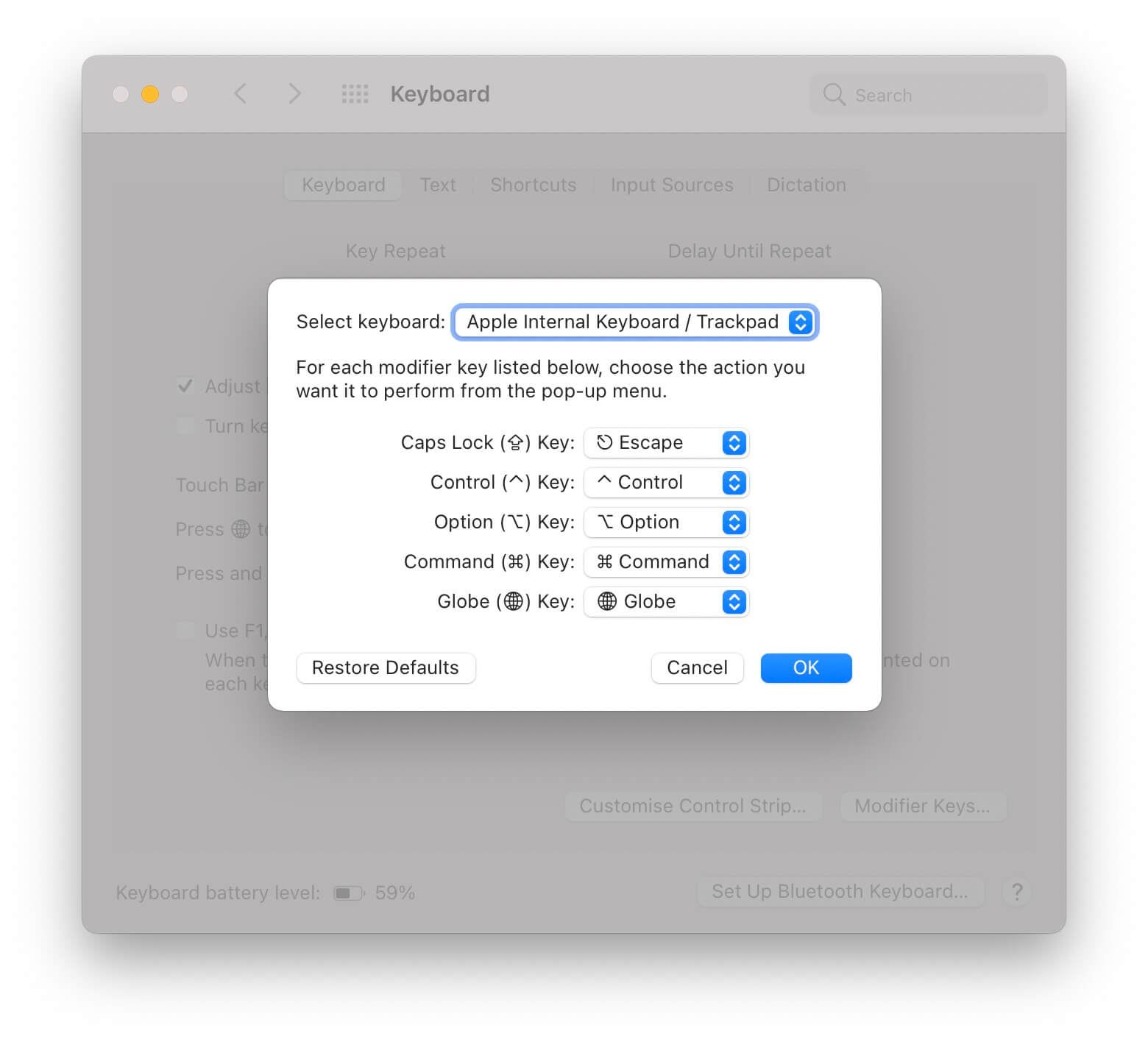
Remap Caps Lock to Escape
I have an (irrational?) hate for the Caps Lock key. It’s big. You bump it. And you barely need it. On the other hand, I often need the Escape key, but it’s hard to reach. Remapping Caps Lock to Escape feeds two birds with one scone.
You can remap Caps Lock in System Preferences > Keyboard > Modifier Keys. This setting is keyboard-specific. I use an external keyboard on my desk, so I need to set this up twice.
Three finger drag
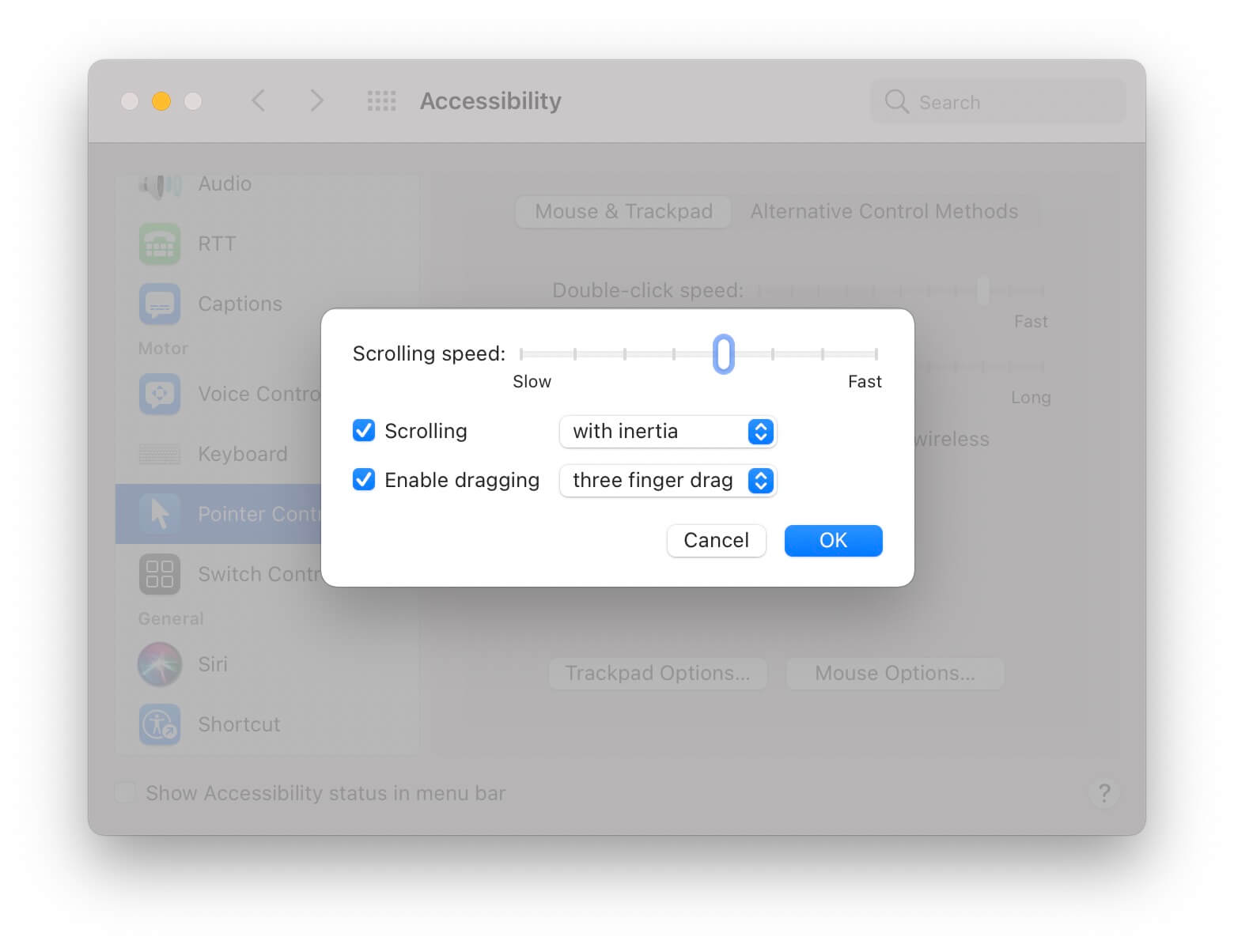
I’m a full-time trackpad user. However, I always found the force you need to apply to drag awkward. Three finger drag allows you to “grab” something by placing three fingers on your trackpad and moving them around.
This setting is a bit hard to find in System Preferences > Accessibility > Pointer Control > Trackpad Options… > Enable dragging three finger drag.
Fast tracking
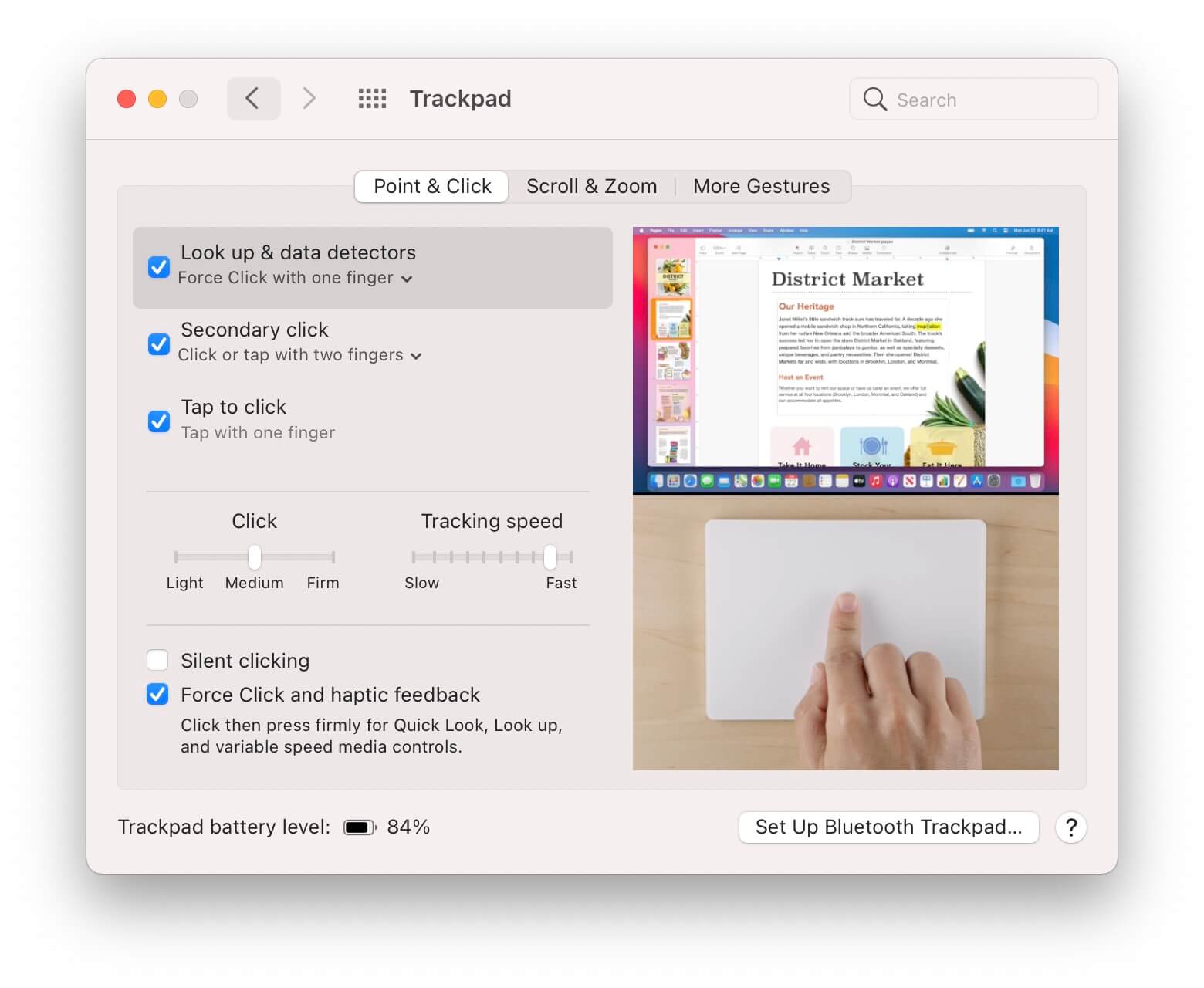
I have my tracking speed almost at the fastest setting. This takes a day to get used to, but once you do every other machine feels slow.
Tracking speed can be set in System Preferences > Trackpad > Point & Click > Tracking speed.
Fast key repeat with a low delay
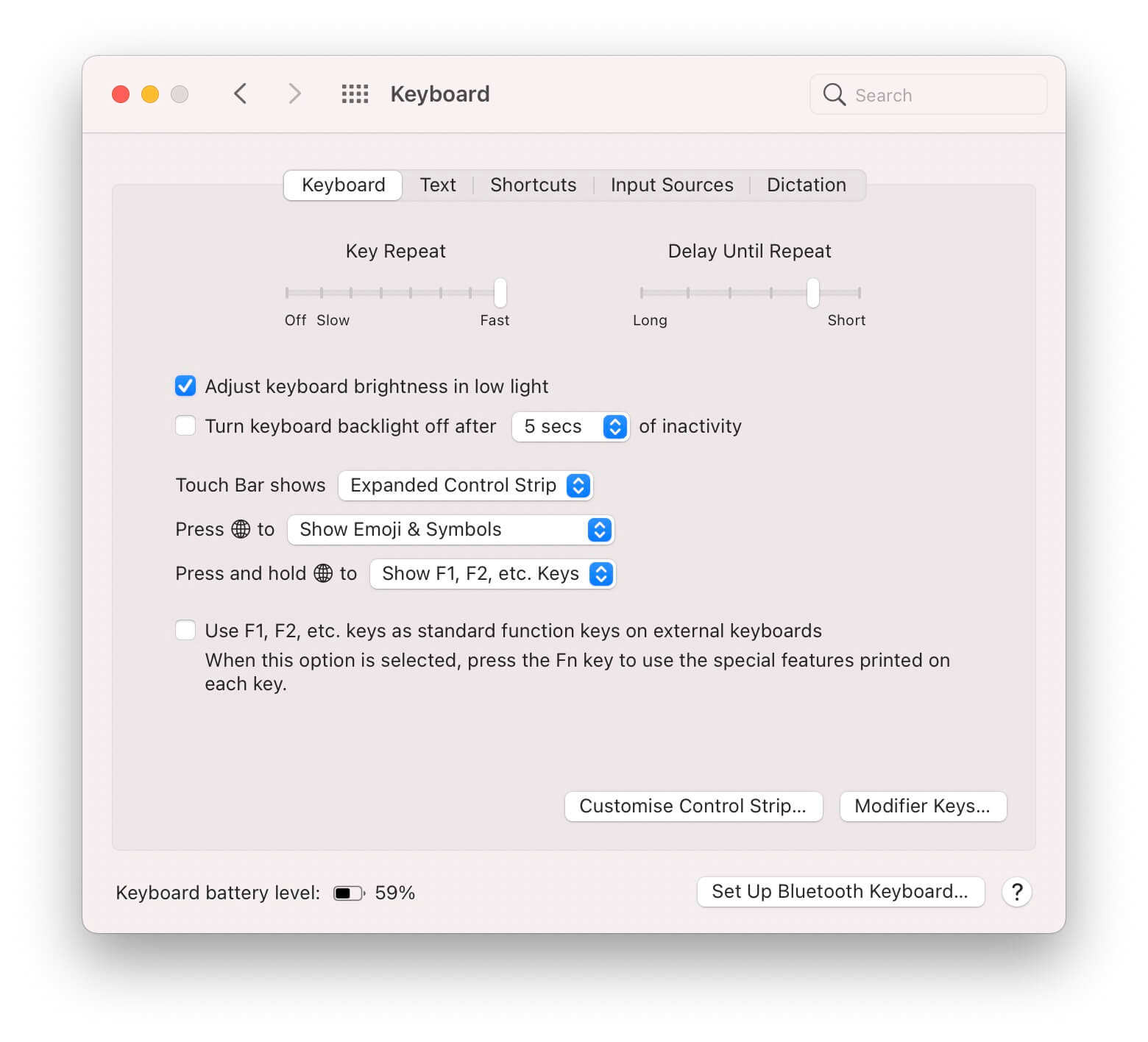
Like my trackpad, I like my keyboard to respond fast too. Key delay means a key will start repeating fast, key repeat will make it repeat fast. This is especially useful for backspace and space.
Key repeat settings are in System Preferences > Keyboard > Keyboard > Key Repeat & Delay Until Repeat.
Keyboard navigation to move focus
This setting allows you to tab through all controls in a UI, in addition to hitting return to confirm.
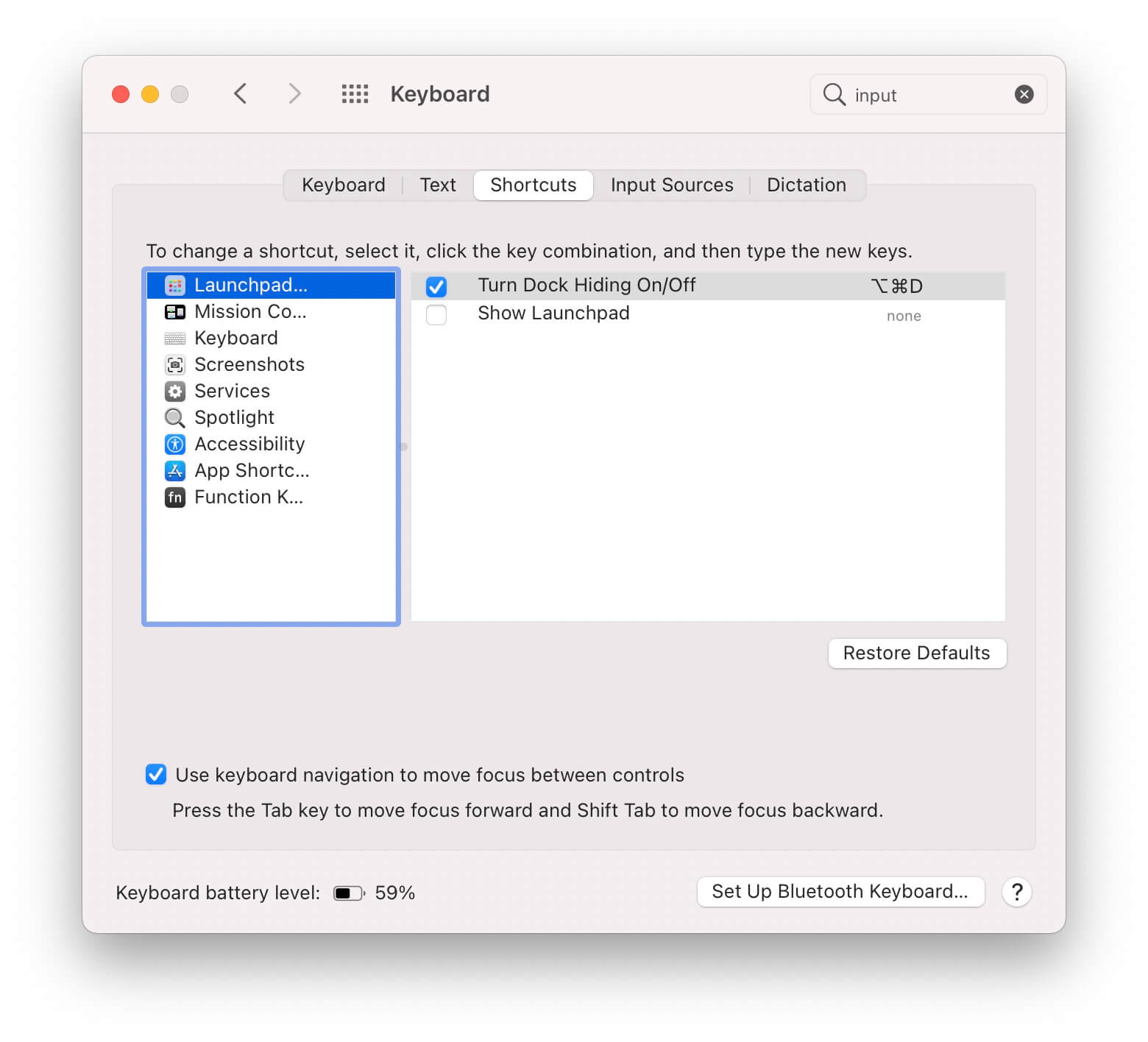
Focus all inputs is in System Preferences > Keyboard > Shortcuts > Accessibility > Use keyboard navigation to move focus between controls.
Hide the Dock
The Dock takes up a lot of space. I don’t really care about having it there persistently, so I hide it. You can set this in System Preferences > Dock & Menu Bar > Automatically hide and show the Dock.
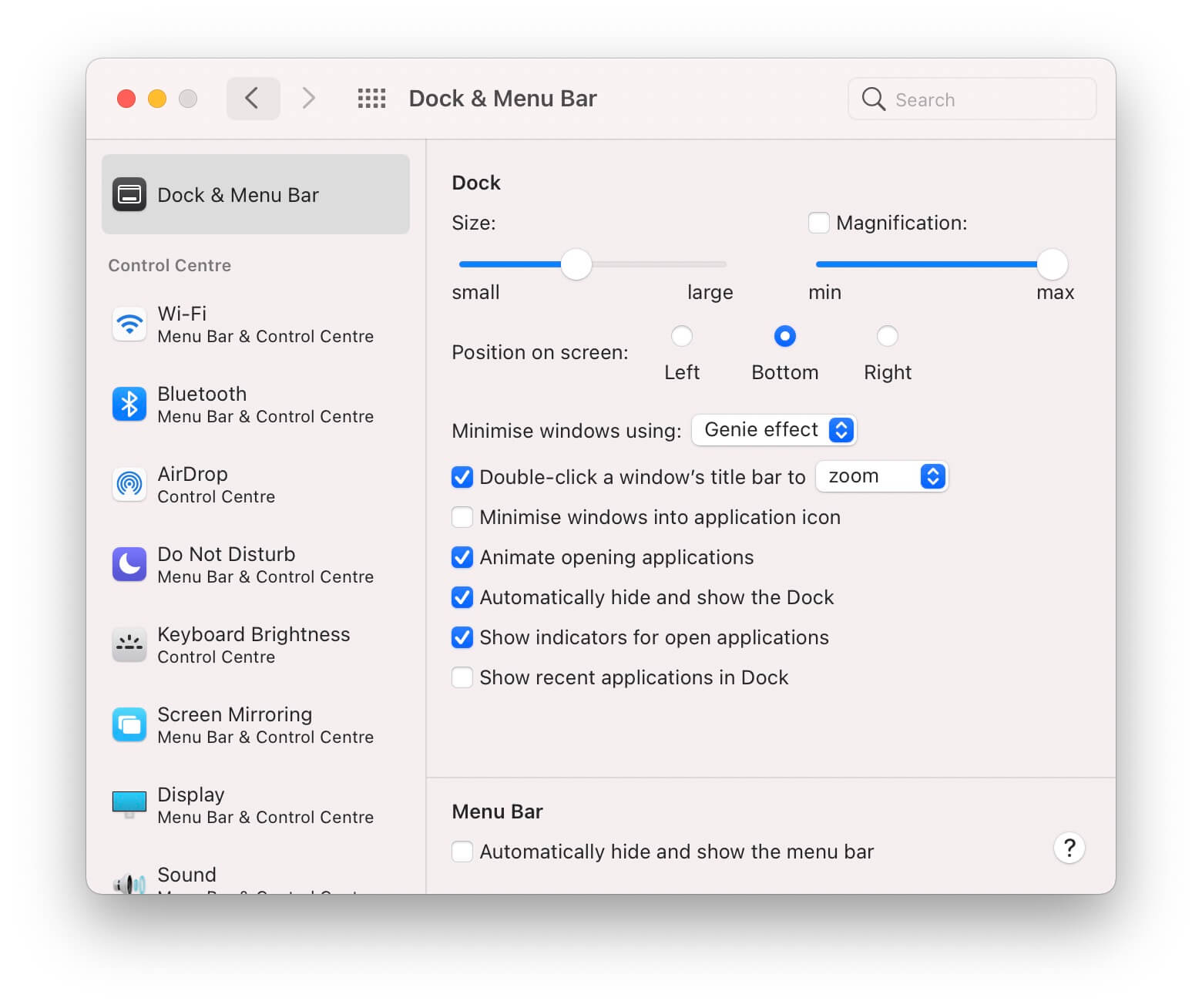
I also tried hiding the Menu Bar for a while, but I like having the clock and other Menu Bar items visible at all times.
Safari tab cycling
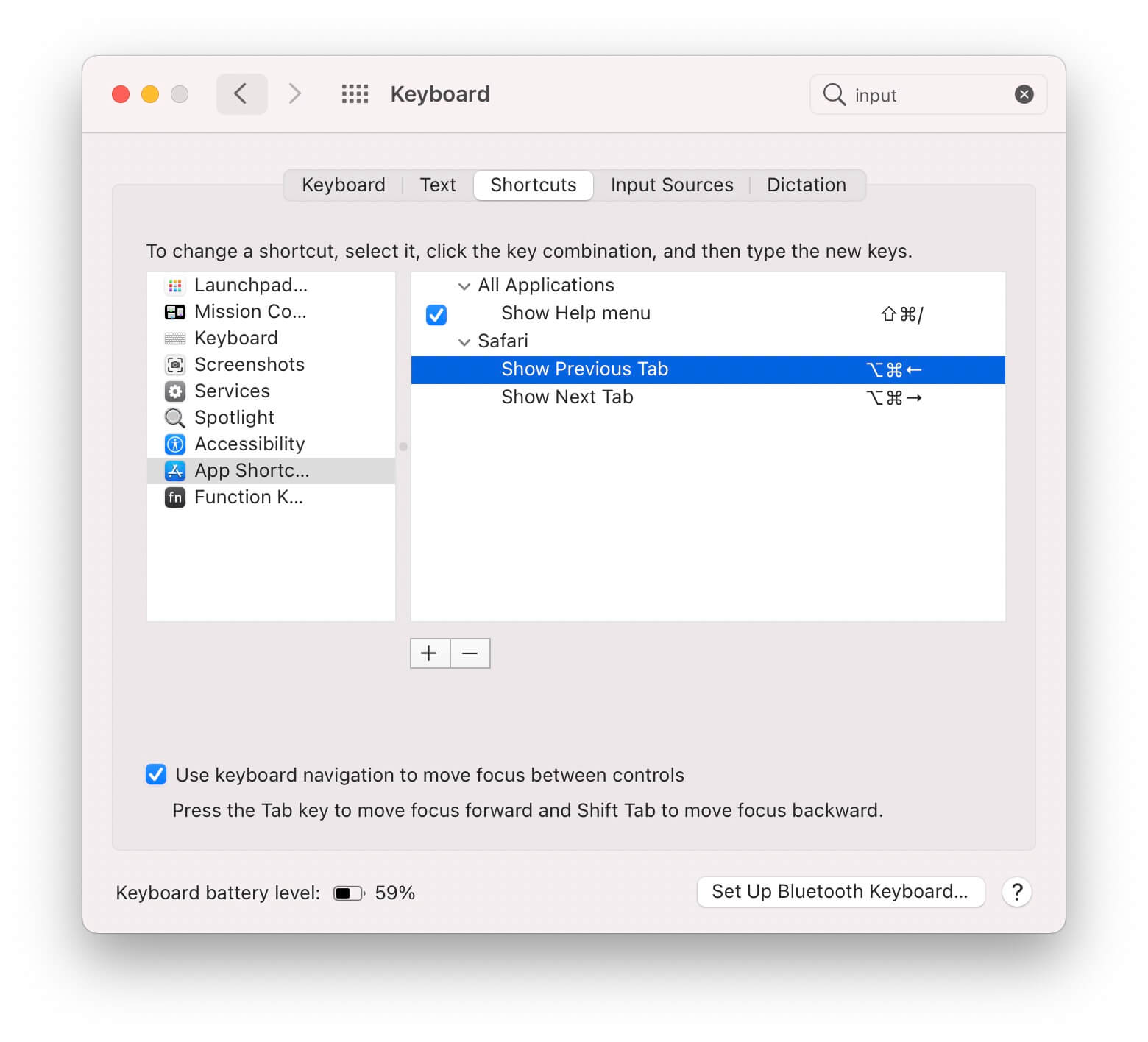
In all apps, I often cycle through tabs with Option+Command+Left and Option+Command+Right. Safari doesn’t have these keys mapped by default, so I added them myself.
You can add custom app shortcuts in System Preferences > Keyboard > Shortcuts > App Shortcuts.
Twitter Break
Around the end of January, I decided to take a break from Twitter for an undetermined amount of time. Twitter was my main source of distraction, and I wanted to find out how much it affects my productivity.
What I didn’t miss
Filling every gap in my time with scrolling through Twitter. I do believe going without Twitter improved my focus throughout the day. Whenever I saw I wasn’t logged in to Twitter, I returned to the whatever I was working on sooner.
There’s still more than enough distraction (newspapers, Hacker News, email,…) to fill the void. Getting rid of Twitter is just a small piece of it.
Drama and pointless discussions. I’m rarely part of hefty discussions, but not seeing them at all for a month made me feel a lot lighter.
Staying in the loop on content. I expected to lose track of interesting content without Twitter as a portal. It turns out most good stuff ends up in my inbox through newsletters anyway. There’s also RSS to fill the gaps.
I’m a lot less informed about world news (the US specifically) I’m reading the local newspaper more often. That informs me about what’s happening around me instead of other corners of the world.
What I missed
Fun. It turns out, Twitter is my favorite spot for non-serious content and banter. These interactions aren’t replaceable by newsletters, RSS, or other platforms. Since Twitter is the only social media platform I actively participate in, I missed this.
A platform for questions and sharing. Twitter is amazing for collective knowledge. It’s amazing that I can ask thousands of developers for guidance by posting a question. The same applies to the other way: it gives me a huge audience to share what I’m working on.
Moving forward
I’m glad I took a break, but I’m happy to be back. In the next few weeks, I’ll do a major following cleanup, refocussing my stream towards things I really enjoy and more local accounts.
The complexity that lives in the GUI
RoyalSloth reviews the three most common patterns to model interconnected state in a user interface.
- Connect the boxes: create the user avatar component and pass its instance to the inventory table component
- Lift the state up: move the internal state of the user avatar component and the state of the inventory table into a separate box/class
- Introduce a message bus: connect the inventory table and the user avatar component to the shared pipe that is used for distributing events in the application
Connect the boxes and lift the state up seem to be the most common choices for React apps; respectively prop drilling and context or single state trees (like Redux).
There’s no silver bullet to UI complexity, all methods have their caveats.
Read the full article on blog.royalsloth.eu.