Reading List
The most recent articles from a list of feeds I subscribe to.
Composable seeders in Laravel with callOnce
Laravel 9 is fresh out the door, and it contains a small contribution of mine: a new callOnce method for database seeders.
It solves a problem with seeders I’ve had for a long time, and thanks to @brendt_gd and @rubenvanassche’s input I was able to propose a lightweight solution. Here’s a quick overview of the problems it solves, and how it’s used.
Say you’re working on a CMS-like project. There are users (than can log in and publish posts), posts, pages, and categories.
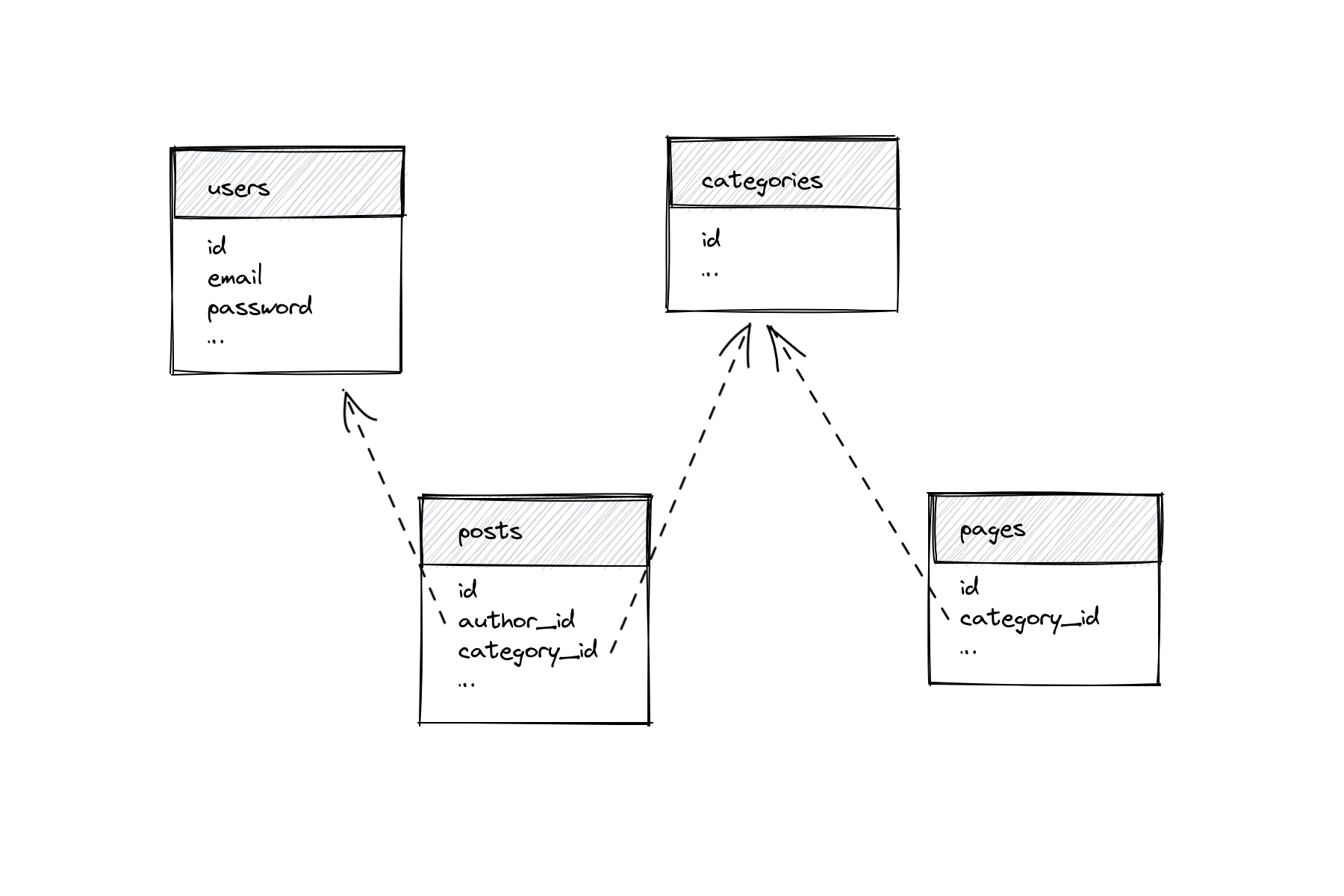
Your seeder would be ordered based on the relationships. Specifically, users and categories need to be seeded before pages and posts.
class DatabaseSeeder extends Seeder
{
public function run()
{
$this->call([
UserSeeder::class,
CategorySeeder::class,
PageSeeder::class,
PostSeeder::class,
]);
}
}
In bigger projects with tens, or hundreds of models, a single DatabaseSeeder can get quite slow. And in any project: if you’re planning to work on a new feature for posts, there’s no reason to wait for pages to seed. But since PostSeeder expects users als categories to already exist, you can’t run in on its own.
You could have PostSeeder seed its own users and categories, but then DatabaseSeeder is seeding a bunch of unnecessary data.
Enter callOnce, a new seeder method in Laravel 9. callOnce works similar to PHP’s own require_once. It will only run a seeder the first time its called.
With callOnce, you specify depending data in the seeders you need them.
class PostSeeder extends Seeder
{
public function run()
{
$this->callOnce([
UserSeeder::class,
CategorySeeder::class,
]);
}
}
class PageSeeder extends Seeder
{
public function run()
{
$this->callOnce([
CategorySeeder::class,
]);
}
}Despite PostSeeder and PageSeeder both calling CategorySeeder, categories will only be seeded once. This allows you to declare all relationship dependencies inside the seeders, without worrying about seeding data multiple times.
I’m looking forward to be able to run seeders specifically for the feature I’m working on, especially in large projects.
Laravel Blade & View Models
A view model represents data for a specific view or page. In its simplest form, a view model is a plain PHP object with a bunch of (typed) properties.
class ProfileViewModel
{
public function __construct(
public User $user,
public array $companies,
public string $action,
) {}
}
View models make the dependencies of a view explicit. With a view model, you don’t need to dig into the view’s markup to find out which data it requires.
To use a view model, instantiate it in your controller action, and pass it to the view. I’ve built the habit to pass view models as $view variables to keep them consistent across all templates.
class ProfileController
{
public function edit()
{
$viewModel = new ProfileViewModel(
user: Auth::user(),
companies: Companies::all(),
action: action([ProfileController::class, 'update']),
);
return view('profile.edit', ['view' => $viewModel]);
}
}
<form action="{{ $view->action }}" method="POST">
<input name="name" value="{{ old('name', $view->user->name) }}">
<select name="company_id">
@foreach($view->companies as $company)
…
@endforeach
</select>
</form>IDE superpowers
And now for the fun part: type hint the variable in a @php block at the start of your Blade view, and start writing HTML.
@php
/** @var $view App\Http\ViewModels\ProfileViewModel */
@endphp
<form action="{{ $view->action }}" method="POST">
<input name="name" value="{{ old('name', $view->user->name) }}">
<select name="company_id">
@foreach($view->companies as $company)
…
@endforeach
</select>
</form>This is where view models shine. An IDE will recognize the @var declaration and provide autocompletion for the view data. In addition, if you rename one of the view’s properties using an IDE’s refactoring capabilities, it’ll also rename the usages in the views.
Refactor rename ProfileViewModel in PhpStorm:
 class ProfileViewModel
{
public function __construct(
public User $user,
- public array $companies,
+ public array $organizations,
public string $action,
) {}
}
ProfileController and profile/edit.blade.php will be automatically updated:
 class ProfileController
{
public function edit()
{
$viewModel = new ProfileViewModel(
user: Auth::user(),
- companies: Companies::all(),
+ organizations: Companies::all(),
action: action([ProfileController::class, 'update']),
);
return view('profile.edit', ['view' => $viewModel]);
}
}
<select name="company_id">
- @foreach($view->companies as $company)
+ @foreach($view->organizations as $company)
…
@endforeach
</select>Computed Data
View models are also a great place to compute data before sending it to a view. This keeps complex statements outside of controllers and views.
class ProfileViewModel
{
public bool $isSpatieMember;
public function __construct(
public User $user,
public array $companies,
public array $organizations,
public string $action,
) {
$this->isSpatieMember =
$user->organization->name === 'Spatie';
}
}
You could implement this as $user->isSpatieMember(), but I prefer view models for one-off things.
Ergonomics
You can standardize the $view variable by creating a base ViewModel class that implements Arrayable.
use Illuminate\Support\Arrayable;
abstract class ViewModel implements Arrayable
{
public function toArray()
{
return ['view' => $this];
}
}
- class ProfileViewModel
+ class ProfileViewModel extends ViewModel
{
// …
} class ProfileController
{
public function edit()
{
// …
- return view('profile.edit', ['view' => $viewModel]);
+ return view('profile.edit', $viewModel);
}
}Granularity
Alternatively, you could be more granular and specify the exact data you want to display instead of passing models.
This approach requires more boilerplate. However, it makes the view’s dependencies more explicit and reusable. For example, this ProfileViewModel could be reused for other models than User.
class ProfileViewModel extends ViewModel
{
public function __construct(
public string $name,
public string $email,
public int $jobId,
public array $jobs,
public string $storeUrl,
) {}
}Using MySQL `order by` while keeping one value at the end
The other day I needed to sort a dataset in MySQL and ensure one value was always at the end. I never fully understood how order by works, so I did some research on how to solve my problem and how order by behaves.
The data set looks like a list of jobs. I want to present them alphabetically sorted. However, one of them is “Other”, and I want that one to appear at the end of the list in my UI.
| id | name |
| 1 | Backend Developer |
| 2 | Designer |
| 3 | Other |
| 4 | Account Manager |
| 5 | Frontend Developer |
Lets jump straight to the solution:
select * from jobs
order by field(name, "Other"), name
The field(value, …list) function returns the (1-based) index of the value in the list. If the value isn’t in the list, it returns 0.
This is what the result of field(name, "Other") looks like for this dataset:
| id | name | field
| 1 | Backend Developer | 0
| 2 | Designer | 0
| 3 | Other | 1
| 4 | Account Manager | 0
| 5 | Frontend Developer | 0
The second part of the solution is using order by for multiple columns.
I always assumed order by would order by the first clause, then the second. This is not entirely true. When you order by multiple values, MySQL treats the first as the primary value to sort by, and the next one as the secondary. This means once the first clause pushes values down or up, they’ll stay there.
To illustrate, here’s a simple dataset with letters and numbers.
| letter | number |
| d | 2 |
| e | 1 |
| c | 3 |
| a | 3 |
| b | 1 |
When we run order by number, letter, MySQL will order by number first, and keep the subsets on their own little islands:
| letter | number |
| e | 1 |
| b | 1 |
| d | 2 |
| c | 3 |
| a | 3 |
Then, MySQL will order the subsets by letter:
| letter | number |
| b | 1 |
| e | 1 |
| d | 2 |
| a | 3 |
| c | 3 |
Back to our jobs dataset, order by field(name, "Other") will push the “Other” value below.
| id | name | field |
| 1 | Backend Developer | 0 |
| 2 | Designer | 0 |
| 4 | Account Manager | 0 |
| 5 | Frontend Developer | 0 |
| 3 | Other | 1 |
The second part of the order by clause will order the subsets by name.
| id | name | field |
| 4 | Account Manager | 0 |
| 1 | Backend Developer | 0 |
| 2 | Designer | 0 |
| 5 | Frontend Developer | 0 |
| 3 | Other | 1 |
With Eloquent in Laravel
If you want to use the field function to order in Laravel, you need to use orderByRaw:
$jobs = Job::query()
->orderByRaw('field(name, "Other")')
->orderBy('name');
If you want to apply this to all queries to the jobs table in our app, you can consider a global scope:
class Job extends Model
{
protected static function boot()
{
static::addGlobalScope(
'order',
fn (Builder $builder) => $builder
->orderByRaw('FIELD(name, "Other")')
->orderBy('name')
);
}
}Eloquent findOrFail caveats
I use Model::findOrFail a lot in Laravel. Recently, I realized it’s not always the best option.
findOrFail is great because it ensures you’ll end up with a model instance. No more “Attempt to read property on null” exceptions.
$title = Post::findOrFail($id)->title;Another benefit is that Laravel returns a 404 response for you when the model doesn’t exist. (This is handled in Laravel’s base exception handler) The 404 response is a double-edged sword. It’s a great feature in controllers and other outer layers of your application, but can be harmful in core business logic.
Validating that a model exists should generally happen in a request object or a controller action. When I’m deep inside the application — like in an action or a service class — a missing model often means there’s an inconsistency in my database state. That’s not the same as a missing resource. Inconsistent database states should generally return a 500 status code, not 404.
In addition, Laravel doesn’t report model not found exceptions to error trackers. This makes sense for 404 responses. But if a model wasn’t found in my core business logic, it means I need to validate earlier or catch the error and deal with it.
I stopped using findOrFail in actions, aggregate roots, and other core business classes. In those places, I’d rather throw a plain exception that my error tracker will pick up.
The Monetization Trap
I want to talk about something I’ve been chewing on for a while: the monetization trap.
Last year, I had a hard time writing a post, sending a newsletter, or researching a topic without considering if it could be part of some grand monetization scheme. Everyone and their dog seemed to have a project that generates passive income; I want a slice too!
Once you start to look at a project through the lens of monetization, the scope blows up. There are practical considerations like pricing and payment infrastructure, but more importantly, accountability towards people paying you. If I start a paid newsletter, I need out enough quality content to give people their money’s worth. Out the door with the writing on a whenever-inspiration-strikes schedule.
The scope blows up before I even get started, and I’m paralyzed from doing anything.
I zoomed out and looked at the grand scheme of things. Why do I write? Why do I code in my spare time? People that bake cakes or tend to their garden aren’t looking to monetize their hobby–the hobby itself is fulfilling. Writing and coding are my creative outlets. I already have a great job. Monetizing a side project wouldn’t affect my life and finances in a significant way, at least not enough to warrant the time and stress.
After reflection, I realized I don’t care about monetization as much as I thought, I got tricked into thinking I did because I see so many people around me building SaaS or selling paid memberships on the side. Does that mean I’ll never monetize anything I do? Not necessarily, but I feel calmer realizing there’s no hurry, and I don’t need to shoehorn anything.