Reading List
The most recent articles from a list of feeds I subscribe to.
A few things I've learned about email marketing
Hello! I’ve been learning a lot about business over the last few years (it’s possible to make a living by helping people learn! it’s amazing!). One of the things I’ve found hardest to get my head around was email marketing.
Like a lot of people, I get a lot of unwanted email, and at first I was really opposed to doing any kind of email marketing because I was worried I’d be the source of that unwanted email. But I’ve learned how to do it in a way that feels good to me, and where the replies to my marketing emails are usually along the lines of “wow, I love this, thank you so much!”. (literally: here are excerpts from the last 20 or so replies I’ve gotten)
I’m going to structure this as a series of beliefs I had about email marketing that turned out not to be universally true.
myth 1: selling things is an adversarial relationship
I used to think that selling things was a sort of adversarial relationship: the person selling the product wants to convince the buyer (by any means necessary) to spend as much money as possible, and that people buying things are usually kind of resentful of anyone asking them to spend money.
I’ve learned that actually a lot of people are happy (or even actively want) to spend money on something that will help them solve a problem they have.
Here’s a silly example of something illustrating this: 2 years ago, we’d hired someone to paint our new apartment. We decided to paint a lot of the walls white, and we were stuck with the impossible problem of deciding which of the 10 billion possible shades of white to paint the walls. I found a $27 ebook called white is complicated, and (long story short, this blog post is not about painting) it really helped me confidently choose a shade of white!! We spent thousands of dollars on painting, so $30 was a really good investment in making sure we’d be happy with the result.
So even though $27 for an ebook on how to choose a white seems silly at first, I was really happy to spend the money, and my guess is a lot of other people who bought that ebook are as well.
The bigger idea here is that it’s easier to run a business when you’re selling to people who are happy to buy things based on the value they’re getting from the product. In my case, I’ve found that there are lots of programmers who are happy to pay for clear, short, friendly explanations of concepts they need to understand for their jobs.
a quick note on how I learned these things: 30x500
I originally wrote this blog post about all these things I learned, and it kind of read like I figured out all of these things naturally over the course of running a business. But that’s not how it went at all! I’ve actually found it very hard to debug business problems on my own. A lot of the attitudes I had when I started out running a business were counterproductive (like thinking of selling something as an adversarial process), and I don’t know that many people who run similar businesses who I can get advice from.
I learned how to think about selling things as a non-adversarial process (and everything else in this blog post, and a lot more) from 30x500, a business class by Amy Hoy (her writing is here) and Alex Hillman that I bought a couple of years ago. 30x500 is about running a specific kind of business (very briefly: sell to people who buy based on value, decide what to build by researching your audience, market by teaching people helpful things), which happens to be the exact kind of business that I run. It’s been a really great way to learn how to run my business better.
Okay, back to my misconceptions about email marketing!
myth 2: sending email is inherently bad
The next thing I believed was that sending email from a business was somehow inherently bad and that all marketing email was unwanted.
I now realize this is untrue even for normal marketing emails – for example, lots of people subscribe to marketing newsletters for brands they like because they want to hear about new products when they come out & sales.
But marketing emails aren’t just “not inherently bad”, they can actually be really useful!
marketing is about building trust
When I started sending out business emails, I based them on the emails I was used to receiving – I’d announce new zines I’d written, and explain why the zine was useful.
But what I’ve learned is that (at least for me) marketing isn’t about describing your product to the audience, marketing is about building trust by helping people.
So, instead of just periodically emailing out “hey, here’s a new zine, here’s why it’s good”, my main marketing email list is called saturday comics, and it sends you 1 email a week with a programming comic.
What I like about this approach to marketing (“just help people learn things for free”) is that it’s literally just what I love doing anyway – I wrote this blog to help people learn things for free for years just because I think it’s fun to help people learn.
And people love the Saturday Comics! And it makes money – I announce new zines to that list as well, and lots of people buy them. It’s really simple and nice!
myth 3: you have to trick people into signing up for your email marketing list
One pattern I see a lot is that I sign up for some free service, and then I start getting deluged with marketing emails trying to convince me to upgrade to the paid tier or whatever. I used to think that this was how marketing emails had to work – you somehow get people’s email and then send them email, and hope that for some reason (???) they decide to buy things from you.
But, of course, this isn’t true! If your marketing list is actually just full of genuinely helpful emails, and you can describe who it’s intended for clearly (give people a link to the archive to see if they like what they see!), then a lot of people will be happy to sign up and receive the emails!
If you clearly communicate who your mailing list will help, then people can easily filter themselves in, and the only people on the list will be happy to be on the list. And then you don’t have to send any unwanted email at all! Hooray!
Here’s one story that influenced how I think about this: once I sent an email to everyone who had bought a past zine saying “hey, I just released this other zine, maybe you want to buy it!”. And I got an angry reply from someone saying something like “why are you emailing me, I just bought that one thing from you, I don’t want you to keep emailing me about other things”. I decided that I agreed with that, and now I’m more careful about being clear about what kinds of emails people are opting into.
marketing is about communicating clearly & honestly
One insight (from Alex Hillman) that helped me a lot recently was – when someone is dissatisfied with something they bought, it doesn’t always mean that the product is “bad”. Maybe the product is helpful to many other people!
But it definitely means that the person’s expectations weren’t met. A tiny example: one of the few refund requests I’ve gotten for a zine was from someone from who expected there to be more information about sed in the zine, and they were disappointed there was only 1 page about sed.
So if I communicate clearly & accurately what problems a product solves, who it’s for, and how it solves those problems, people are much more likely to be delighted when they buy it and be happy to buy from me again in the future!. For my zines specifically, I like to make the table of contents very easy to find so that people can see that there’s 1 page about sed :)
myth 4: you have to constantly produce new emails
I’ve tried and failed to start a lot of mailing lists. the pattern I kept getting stuck in was:
I have an idea for a weekly mailing list I send 2 emails I give up forever
This was partly because I thought that to have a weekly/biweekly mailing list, you have to write new emails every week. And some people definitely do mailing lists this way, like Austin Kleon.
But I learned that there’s a different way to write a mailing list! Instead, you:
put together a list of your best articles / comics / whatever when someone subscribes to that list, send them 1 email a week (or every 2 weeks, or whatever) with one article from the List Of Your Best Articles
The point is most people in the world probably haven’t already read your best articles, and so if you just send them one article a week from that list, it’ll probably actually be MORE helpful to them than if you were writing a new article every week. And you don’t need to write any emails every week!
I think this is called a “drip marketing campaign”, but when I search for that term I don’t find the results super helpful – there’s a lot out there about tools to do this, but as with anything I think the actual content of the emails is the most important thing.
myth 5: unsubscribes are the end of the world
Another email marketing thing I used to get stressed out about was unsubscribes. It always feels a little sad to send an email about something I’m excited about and see 20 people unsubscribe immediately, even if it’s only 0.3% of people on the mailing list.
But I know that I subscribe to mailing lists very liberally, even on topics that I’m not that interested in, and 70% of the time I decide that I’m not that interested in the topic and unsubscribe eventually. A small percentage of people unsubscribing really just isn’t that big of a deal.
myth 6: you need to optimize your open rates
There are all kinds of analytics you can do with email marketing, like open rates. I love numbers and analyzing things, but so far I really haven’t found trying to A/B test or optimize my numbers to be that productive or healthy. I’d rather spend my energy on just writing more helpful things for people to read.
The most important thing I’ve learned about website analytics is that it’s unproductive to look at random statistics like “the open rate on this email is 43% but the last one was 47%” and wonder what they mean. What has been helpful has been coming up with a few specific questions that are important to me (“are people visiting this page from links on other sites, or only from my links?”) and keeping very rough track of the answers over time.
So far I’ve really never used any of the tracking features of my email marketing software. The only thing I’ve done that I’ve found helpful is: sometimes when I release a new zine I’ll send out a discount code to people on the list, and I can tell if people bought the thing from the mailing list because they used the discount code.
it’s important to remember there are people on the other side
The last thing that’s helped me is to remember that even though emailing thousands of people sometimes feels like a weird anonymous thing, there are a lot of very delightful people on the other side! So when I write emails, I usually try to imagine that I’m writing to some very nice person I met at a conference one time who told me that they like my blog. We’re not best friends, but they know my work to some extent, and they’re interested to hear what I have to say.
I often like to remind people why they’re getting the email, especially if I haven’t emailed that list for a long time – “you signed up to get announcements when I release a new zine, so here’s an announcement!”. I think the technical email marketing term for this is a list being “cold” and “warm”, like if you don’t email a list for too long it’s “cold” and your subscribers might have forgotten that they’re on it.
that’s all!
When I started, I was really convinced that email marketing was this terrible, awful thing that I could not do that mostly involved tricking people into getting emails they don’t want (ok, I’m exaggerating a bit, but I really struggled with it). But it’s possible to do it in a transparent way where I’m mostly just sending people helpful emails that they do want!
The big surprise for me was that email marketing is not a monolithic thing. I have a lot of choices about how to do it, and if I don’t like the way someone else does email marketing, I can just make different choices when doing it myself!
ninja: a simple way to do builds
Hello! Every so often I find a new piece of software I really like, and today I want to talk about one of my recent favourites: ninja!
incremental builds are useful
I do a lot of small projects where I want to set up incremental builds – for
example, right now I’m writing a zine about bash, and I have one .svg file
for each page of the zine. I need to convert the SVGs to PDFs, and I’d been
doing it something like this:
for i in *.svg
do
    svg2pdf $i $i.pdf # or ${i/.svg/.pdf} if you want to get really fancy
done
This works fine, but my svg2pdf script is a little slow (it uses Inkscape), and it’s annoying
to have to wait 90 seconds or whatever to rebuild all the PDFs when I’ve just updated 1 page.
build systems are confusing
In the past I’ve been pretty put off by using a Build System like make or bazel
for my small projects because bazel is this Big Complicated Thing and make
feels a little arcane to me. I don’t really know how to use either of them.
So for a long time I’ve just written a bash script or something for my builds and resigned myself to just waiting for a minute sometimes.
ninja is an EXTREMELY SIMPLE build system
But ninja is not complicated! Here is literally everything I know about ninja
build file syntax: how to create a rule and a build:
a rule has a command and description (the description is just for humans to read so you can tell what it’s doing when it’s building your code)
rule svg2pdf
  command = inkscape $in --export-text-to-path --export-pdf=$out
  description = svg2pdf $in $out
the syntax for build is build output_file: rule_name input_files. Here’s
one using the svg2pdf rule. The output goes in $out in the rule and the
input goes in $in.
build pdfs/variables.pdf: svg2pdf variables.svg
That’s it! If you put those two things in a file called build.ninja and then run ninja,
ninja will run inkscape variables.svg --export-text-to-path --export-pdf=pdfs/variables.pdf. And then if you run it again, it won’t run
anything (because it can tell that you’ve already built pdfs/variables.pdf and you’re up to date)
Ninja has a few more features than this (see the manual), but I haven’t used them yet. It was originally built for Chromium, so even with a small feature set it can support large builds.
ninja files are usually automatically generated
The magic of ninja is that instead of having to use some confusing Build
Language that’s hard to remember because you use it so infrequently (like
make), instead the ninja language is SUPER simple, and if you want to do
something complicated then you can generate the build file you want using any
programming language you want. I find this this a lot easier because I know
Python, but I can never remember anything about how the make language works.
I like to make a build.py file or that looks something like this, that
creates the ninja build file and then runs ninja:
with open('build.ninja', 'w') as ninja_file:
    # write some rules
    ninja_file.write("""
rule svg2pdf
  command = inkscape $in --export-text-to-path --export-pdf=$out
  description = svg2pdf $in $out
""")

    # some for loop with every file I need to build
    for filename in things_to_convert:
        ninja_file.write(f"""
build {filename.replace('svg', 'pdf')}: svg2pdf {filename}
""")

# run ninja
import subprocess
subprocess.check_call(['ninja'])
I’m sure there are a bunch of ninja best practices, but I don’t know them and for my small projects I find this works well.
meson is a build system that generates ninja files
I don’t know too much about Meson yet,
but recently I was building a C program (plocate, a faster alternative to locate)
and I noticed that instead of the usual ./configure; make; make install,
there were different build instructions:
meson builddir
cd builddir
ninja
It seems like Meson is a build system for C/C++/Java/Rust/Fortran that can use ninja as a backend.
that’s all!
I’ve been using ninja for a few months now. I really like it and it’s caused me approximately 0 build-related headaches which feels pretty magical to me.
Wizard Zines' first print run: Help! I have a Manager!
Hello! For the first time, Wizard Zines is doing a ★★print shipment★★!
I printed out 400 copies of Help! I have a manager! at the best print shop I could find in Montreal and they’re ready to ship to you. Free shipping to anywhere in the world (as long as Canada Post will let me ship there) is included. The deadline to order a zine is September 6.
I’ve wanted to get into printing and shipping my zines for a long time, so I’m very excited to try this out. So far the only option has been for people to print them on their home printers or at their local print shop.
I’m doing all the packaging and shipping myself from my house, so I’m going to ship them all out in a big batch around September 7.
the zines!
Here’s a picture of one of the boxes of zines! So many zines!
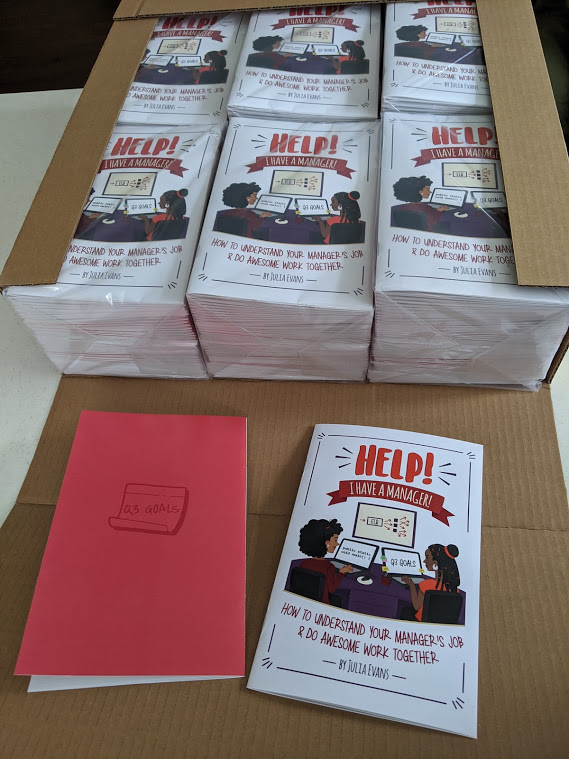
I experimented with a few different print shops in Montreal, and I found out that using a print shop that cost more got me way better quality zines! So that’s what I did. (I went with Photosynthèse).
why I’m shipping them myself
I spent a bunch of time looking into fulfillment companies to try to ~scale~ printing & shipping zines. That research might still come in handy if this first batch goes well (I probably won’t keep doing it myself forever!), but in the spirit of flintstoning, I decided it would be a lot simpler to start out by not overengineering the process. Shipping a zine to the US from Canada using letter mail only costs about $3, so I can even include free shipping.
I’ve actually shipped 100 zines once before in an indiegogo campaign I ran in 2016, and it wasn’t too bad, so I’m confident that I can ship 400 zines manually as long as I can do it all in one giant batch. That time I even wrote all the addresses by hand, which I definitely won’t do this time.
And doing it myself means I can do some fun things with the envelopes & my laser printer that would be hard to convince a fulfillment company to do.
FAQ
Here’s a FAQ which will hopefully answer all your questions! Email me at print@wizardzines.com if you have other questions.
What’s included?
You’ll get:
- A print copy of Help! I have a manager!, printed in full colour on high quality paper.
- A PDF copy of Help! I have a manager! (which usually costs $10 on its own).
What’s the order deadline?
The deadline to order a zine is September 6.
When will I get it?
I’ll mail all the zines around September 7-8, 2020 (right after orders close).
You should get your zine about a week later, assuming the mail system behaves.
Will I get a tracking number?
No. All the zines will be shipped by first class letter mail from Canada, without any tracking. This keeps shipping costs down so that I can do free shipping :). If anything at all goes wrong with your shipment, just let me know (print@wizardzines.com) and I’ll mail you another one. (it’s like UDP!)
The zines should reach the US in about a week, longer if you’re overseas.
Can I order more than one copy at a time?
No, to keep things simple, I’m only shipping one zine at a time. I’m hoping to do batches in the future though!
Can I order these for my team?
Yes! You’ll just need to make one order per person, so that I get everyone’s shipping address. This is extremely compatible with remote work :)
also, if you want to order 50 or more print copies mailed to a single address, email me and we’ll work something out
What happens if I don’t order by September 6?
If this print run sells out, we’ll print more in the future!
What if I already bought the digital copy?
If you already bought the digital copy – thank you!! You can email me at print@wizardzines.com and I’ll send you a discount code to get the print version for less.
What are your future print plans?
If this print run goes well, I’ll figure out how to scale the process up beyond “let’s ship 400 zines from my house”. I’m not sure how that will work yet, but we’ll figure it out!
here’s the link again!
Here’s the link to order a print copy, again! If you just want the PDF, you can get it here: Help! I have a Manager! PDF.
Implementing 'focus and reply' for Fastmail with JMAP
Last month I switched my email to Fastmail. One fun thing about Fastmail is that they built a new protocol called JMAP which is much easier to use than IMAP. So over the last couple of days I built a fun tiny email feature for myself to use with JMAP.
The point of this post is mostly to give a simple end-to-end example of how to use the JMAP API becuase I couldn’t find a lot of examples when I was figuring it out. Here’s the github repo and a gist which shows how to authenticate & make your first request.
cool feature from Hey: focus & reply
I tried the https://hey.com email service for a little bit when it came out. It wasn’t for me, but I liked their “focus and reply” feature. Here’s a screenshot of what it looks like (from a video on their marketing site page for the feature)
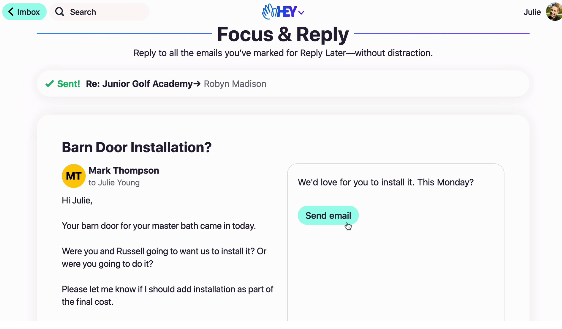
Basically it makes replying to a lot of emails in a batch a little simpler. So I thought – can I use JMAP to implement this focus & reply feature from Hey?
step 0: make the feature simpler
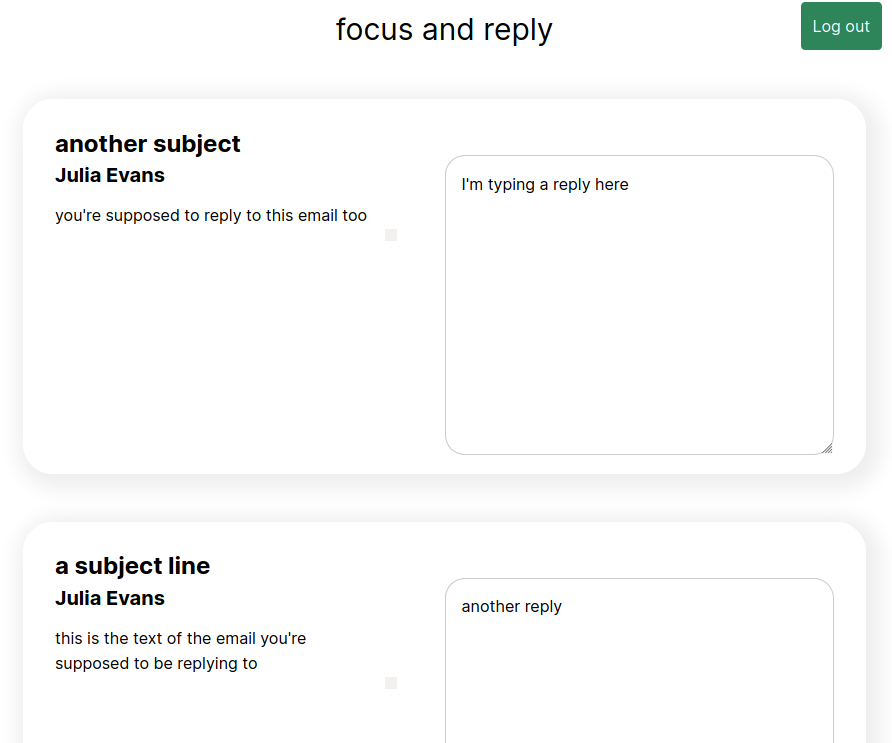
I was a bit too scared to actually send email to start (read-only is safe!), so I decided to start by just making a UI that would show me all the emails I needed to reply to and give me a text box to fill in the replies. Then I could copy and paste the replies into my webmail client to send them. This is a little janky, but I don’t mind it for now.
Here’s an example of what that looks like:
step 0.5: have a “Reply Later” folder in Fastmail
I already had a folder named “Reply Later” in Fastmail, where I manually filed away emails that I needed to reply to but hadn’t gotten to yet. So I had a data source to use! Hooray. Time to start coding.
step 1: get started with JMAP
I couldn’t find a quickstart guide for using JMAP with Fastmail and I was confused about how to do it for quite a while, so part of my goal with this blog post is to give an example of how to get started. I put all the code you need to make your first API request in a gist: fastmail-jmap-quickstart.js
You can authenticate all your requests with HTTP Basic authentication with your username and a Fastmail app password.
Here’s the basics of how it works.
- Make a GET request to https://jmap.fastmail.com/.well-known/jmap. This gives
you a “session” in response, gives you your account ID. You need
this account ID for all the other API calls. I found this a bit surprising
because I usually expect things in
.well-knownto be static files, but this one is a dynamic endpoint that you authenticate to with HTTP Basic authentication. (using your email / app password) - Use that account ID to make requests to the JMAP API at https://jmap.fastmail.com/api/
One thing that threw me off about JMAP at first is that you have to wrap all your API requsts with
{
    "using": [ "urn:ietf:params:jmap:core", "urn:ietf:params:jmap:mail" ],
    "methodCalls": YOUR_REQUEST_HERE
}
For example, this is a request to get a list of all your mailboxes (folders). I think "0" is the ID of the request:
{
    "using": [ "urn:ietf:params:jmap:core", "urn:ietf:params:jmap:mail" ],
    "methodCalls": [[ "Mailbox/get", {
        "accountId": accountId,
        "ids": null
    }, "0" ]]
}
The API wasn’t that intuitive at first, but I was able to figure how to do what I wanted to by reading the spec at https://jmap.io.
step 2: get all my emails
Here’s the query I used to get my emails from JMAP. I basically just copied this from the examples in the JMAP documentation, but I think it’s interesting that it’s not just 1 query, it’s actually 5 different chained queries that build on top of each other. For example, you have:
[ "Email/query", {
    "accountId": accountId,
        // todo: actually do the reply later thing
        "filter": { "inMailbox": mailbox_id },
        "sort": [{ "property": "receivedAt", "isAscending": false }],
        "collapseThreads": true,
        "position": 0,
        "limit": 20,
        "calculateTotal": true
}, "t0" ],
[ "Email/get", {
    "accountId": accountId,
    "#ids": {
        "resultOf": "t0",
        "name": "Email/query",
        "path": "/ids"
    },
    "properties": [ "threadId" ]
}, "t1" ],
...
This queries for a list of all the email IDs in a specific mailbox (my “reply
later” mailbox), calls it t0, and then uses the results of t0 to request
all of those emails.
One of the big ideas in JMAP seems to be this chaining – it really reduces latency if you can do all your work in a single request.
step 3: render the emails!
Once I had all the emails, rendering them was pretty easy – I just used vue.js + Tailwind. The whole thing came out to 170 lines of not-particularly-well-organized Javascript.
the results
It works! It’s already helped me reply to some emails. The github repo is https://github.com/jvns/focus-reply-fastmail.
there are at least 2 problems with this code (and probably more):
- it’s storing passwords in local storage, which I think is not a good security practice.
- it had some XSS vulnerabilities, which I think I’ve finally fixed by putting
the plaintext email in a
<pre>(so that newlines come through) and escaping any HTML entities in there. (<pre>{{email}}</pre>, in Vue)
fastmail seems to use JMAP in a different way than this
I got curious so I used the Network tab to look at how Fastmail’s web interfaces uses jmap.
- Fastmail’s webmail interface doesn’t seem to use https://jmap.fastmail.com/ – instead it uses https://www.fastmail.com/jmap/api. Maybe it’s just a proxy they use so that the requests are being made to the same origin? Unclear.
- It also authenticates in a different way, using
Authorization: Bearer. It seems like this might be a better way to authenticate, but I haven’t found any information about how to get aBearerauthentication like this to use instead of using an app password. - The requests it sends are sometimes compressed with deflate for some reason (instead of gzip), which I guess is fine but it means it’s impossible to look at them in dev tools because Firefox doesn’t understand deflate. Weird!
some links to resources
- JMAP crash course (which I only found after I’d already finished doing this but looks very useful!)
- Fastmail has some JMAP sample code on github
- https://jmap.io/ for the specs
- https://github.com/cure53/DOMPurify is an HTML sanitizer which looks useful for preventing XSS
this seems like a fun way to do email experiments!
I think the idea that anyone can just use JMAP to make fun email UI experiments without dealing with the Hard Parts of email is really fun!
And it’s really cool that I could get this to work 100% as a frontend app, without any server code at all! All the email data is accessible via JMAP, so it seems extremely possible to just do everything with JMAP requests from the client.
Some possible future zines
Hello! I’ve been thinking about what zines I want to write in the future a bit. Usually I don’t have any plans for what I’m going to write next, but having no plan at all feels like it might be getting a bit old.
So this post is mostly a way for me to try to organize my thoughts about why I choose certain topics and what I might want to write in the future.
the criteria
I’m interested in writing about things that are
- fundamental in some way
- very useful to know in your programming job
- stable (the basics of SQL / git / CSS / HTTP / Linux aren’t going to change any time in the next 5-10 years!)
- possible to learn the basics of quickly
There are a LOT of topics that fit these criteria. As I was thinking about topics, I realized that there are lots of topics (like object oriented programming principles) that I think could in theory be pretty valuable but that just didn’t speak to me. What’s up with that?
I only write about topics that I care about
I think a thing that I was missing was – I only write about topics that I really think are exciting and fun and important and want to share with people. Some topics I have kind of a weird and complicated love for, like containers (why are they so weird?!).
And right now I’m writing about CSS, which I’m only learning how to love pretty recently.
I think it’s often important for me to write about topics which I now love but in the past did not love. For example, it took me a very long time to understand how to use tcpdump, and once I got it I felt like I had to tell everyone HELLO I FIGURED IT OUT TCPDUMP IS ACTUALLY AWESOME AND NOT THAT HARD.
It feels a lot less interesting to write about topics where it was immediately obvious to me why they were great or which were easy for me to learn.
zines that I might write
- shell scripting
- debugging (I have 70% of a debugging zine!)
- testing
- more linux internals
- C basics
- gdb
- binary, character encodings, binary formats
- how git works
- TLS certificates, CSRs, CAs, etc.
- profiling
- data structures: graph theory / binary trees / hashmaps
- the Python standard library and/or fun Python basics
- pandas and/or numpy (though I think maybe the pandas cookbook is a better medium for that than a zine)
- machine learning (maybe just logistic regression?)
and a few that I think might be too small or too big for a zine:
- Rust (too big!)
- DNS (maybe a mini zine one day? I really love DNS & dig!)
zines that I don’t think I can write
Here are some topics for zines that I think are “fundamental” in the same way and that I think could be really cool. I don’t think that I could write these today, either because I don’t know enough about the topic yet or because I don’t really feel enough love for it yet.
As with most things, the only way I’ll probably learn more about these is if I end up using them more.
- web accessibility
- postgres (transactions etc?)
- x86 assembly
- hashing (bcrypt, sha-1, md5, etc)
- encryption
- JVM internals
- code review
- kubernetes
- websockets (is there enough to write a whole zine about websockets? I don’t know!)
- functional programming / object oriented programming
- ‘big data’ topics (hadoop, data warehouses, etc)
- paxos or raft
- how search works (like elasticsearch)
- how databases work
that’s all!
I’m still not sure (even after doing this for years!) why it’s so hard for me to tell what topics will make for a good zine that I can write. Maybe one day I will figure it out!